Evoto AI Review: How AI Photo Editing Can Save Photographers Time
By Angela Adams
Time is one of the most valuable commodities for a working photographer.
Every hour spent editing is an hour that can’t be spent photographing clients, marketing your business, developing new work or simply enjoying some time away from the computer.
That is one of the reasons AI photo editing has attracted so much attention from professional photographers.
Evoto AI is designed specifically around the professional photography workflow, with tools for portrait retouching, colour adjustments, background editing, batch processing and other time-saving tasks. The software has continued to develop considerably since it first appeared, so the exact features and pricing available today can change as new versions are released.
But does AI actually save a working photographer meaningful amounts of time?
Photographer Angela Adams has been using Evoto as part of her workflow for several months. Here is what she discovered.
What is Evoto AI?
Evoto AI is an AI-powered photo editing application aimed at professional photographers, particularly those working with portraits, weddings, headshots and high volumes of images.
The software combines automated AI tools with more traditional editing controls, allowing photographers to make changes using sliders and adjustments rather than having to perform every retouching task manually.
Current features include portrait retouching, colour adjustments, background adjustments, batch editing and tethered shooting, with the software continuing to receive new features and updates.
The important distinction is that AI doesn’t have to mean handing over complete creative control.
Used carefully, it can simply take care of some of the repetitive work.
Why I started using AI photo editing
Let me start by saying that this is an honest review based on my own experience using Evoto and incorporating it into my photography workflow.
Let’s deal with the elephant in the room.
Evoto is AI.
Some photographers are excited by what AI can do, while others are understandably concerned about where the technology could take the photography industry.
We’ve been through similar debates before.
Digital cameras changed photography. Mirrorless cameras changed photography. Image-editing software changed photography.
AI is now another part of that evolution.
None of us knows exactly how artificial intelligence will affect creative industries over the next decade, but for me the more immediate question is simpler:
Can it make my working life easier without compromising the quality of my photography?
For my workflow, the answer has been yes.
How much time can AI editing save?
The biggest benefit I’ve found is speed.
A corporate headshot editing job that might previously have taken me three or four hours can be completed in considerably less time using Evoto.
The exact time saving will obviously depend on the number of images, the type of photography and the amount of retouching required, but that’s where AI editing can become particularly valuable for professional photographers.
Imagine photographing more than 100 corporate headshots in a morning.
Even saving a few minutes per image can add up to a significant amount of time.
And time saved in the editing room can be used elsewhere in the business.
You could photograph another client.
Work on your marketing.
Respond to enquiries.
Develop your portfolio.
Or simply finish work earlier.
That’s where the financial value of faster editing becomes much more interesting than simply asking how much the software costs.
Getting started with Evoto AI
One of the things I liked about Evoto was how quickly I could get started.
The interface will feel familiar to photographers who have used other editing applications.
You can import individual images or larger collections, apply adjustments and synchronise edits across multiple photographs.
The software also provides presets and a range of automated tools, while still allowing you to make more detailed adjustments when required.
Current versions of Evoto also support batch workflows and tethered shooting, making the software relevant beyond simply retouching one portrait at a time.
As with any new editing application, I would recommend spending a little time looking through the settings before diving into a major client job.
Learn how the software works first.
Then introduce it into your professional workflow.
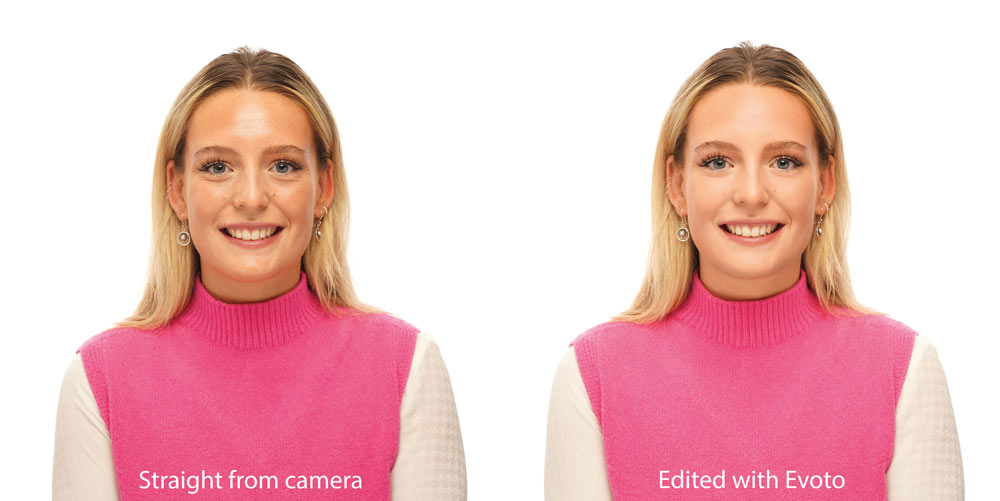
AI portrait retouching
One of my favourite aspects of Evoto is the automated portrait retouching.
Tasks that previously required multiple Photoshop layers and techniques such as frequency separation can be approached using considerably simpler controls.
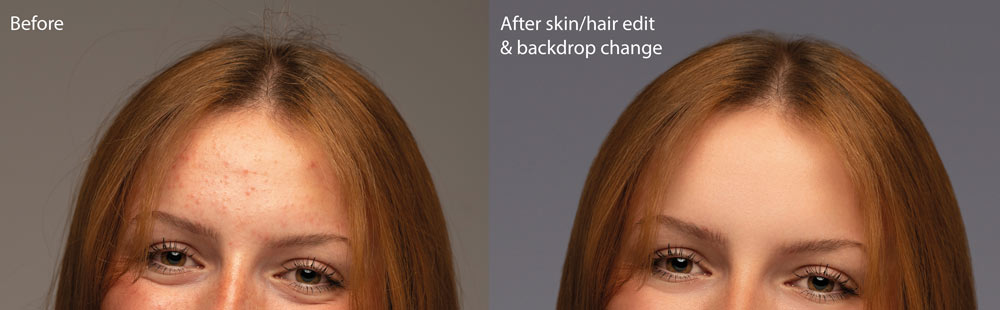
Skin retouching, blemish removal and facial adjustments can be made through dedicated tools rather than requiring every correction to be performed manually.
But there is an important warning here:
Don’t overdo it.
AI makes it incredibly easy to apply an effect.
That doesn’t mean you should.
A professional portrait should still look like the person who stood in front of your camera.
The aim should be to improve the photograph, not remove every natural feature that makes the person recognisable.
Background editing
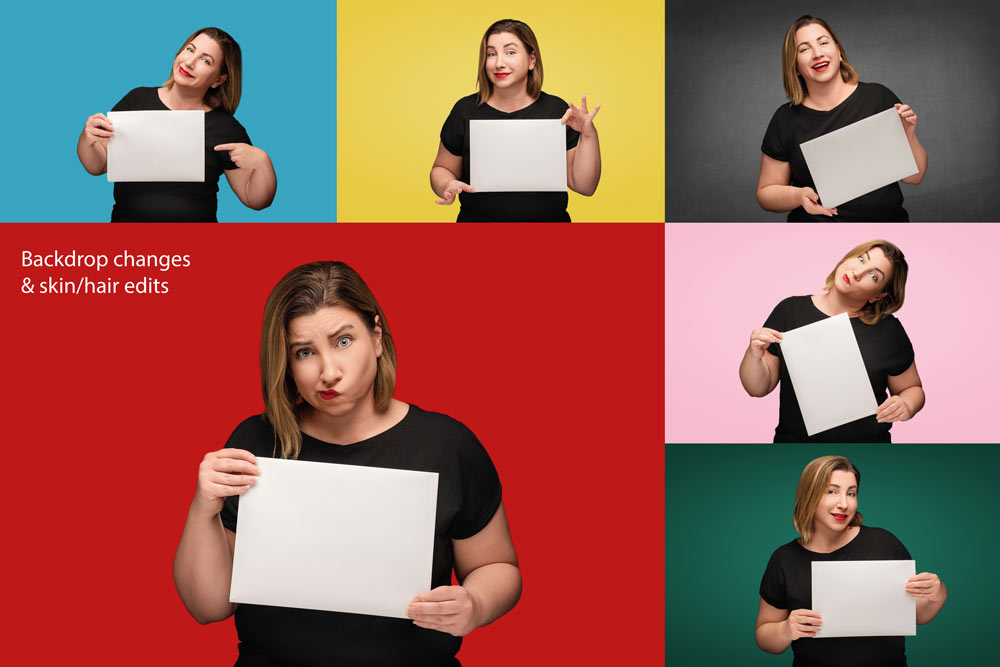
Background editing is another area where AI can save considerable time.
Removing distractions or changing a background manually can involve careful selections, masking and retouching.
AI-powered tools can automate much of this process.
Evoto currently includes background adjustment tools alongside portrait retouching and other AI editing functions.
As always, check the result carefully.
AI can produce convincing results, but it isn’t infallible. Hair, fine details, complex edges and unusual lighting can all present challenges.
The photographer still needs to make the final decision.
Clothing and wrinkle removal
One of my favourite tools has been clothing de-wrinkling.
Anyone who photographs corporate headshots will know the problem.
You can carefully prepare the studio, organise your lighting and get everything ready, only for someone to arrive wearing a shirt or jacket that looks as though it has spent the morning at the bottom of a suitcase.
When you’re photographing a large number of people in one session, fixing those problems manually can become incredibly time-consuming.
An automated tool that can reduce the work involved is therefore genuinely useful.
Again, subtlety matters.
The goal isn’t to create completely artificial clothing.
It’s to remove distracting wrinkles while retaining a believable appearance.
Body and facial adjustments
AI editing can also make certain adjustments that would previously have required considerably more manual work.
Facial reshaping and body adjustments can be useful in situations where a subtle correction is appropriate.
But this is one area where photographers should be particularly careful.
There is a difference between making a small correction and fundamentally changing someone’s appearance.
If you are working on client portraits, the safest approach is generally to make changes that enhance rather than transform.
The technology gives you the ability to make dramatic alterations.
Professional judgement tells you when not to.
Colour and finishing
Evoto isn’t only about portrait retouching.
Its current feature set also includes colour adjustment and grading tools, allowing photographers to work on the overall appearance of their images as well as individual subjects.
This is important because a professional workflow shouldn’t necessarily involve sending an image through one application for AI retouching and another for every other adjustment.
The more of the workflow you can manage efficiently, the more time you potentially save.
Batch editing is where AI becomes really interesting
For photographers working with large numbers of images, batch processing can be one of the most valuable aspects of an AI editing workflow.
A single portrait isn’t necessarily where the biggest time saving occurs.
It’s when you have hundreds of photographs.
Wedding photographers, school photographers, corporate headshot photographers and high-volume portrait studios can all face significant editing workloads.
Being able to apply a consistent look or synchronise adjustments across a large collection can dramatically reduce repetitive work.
Evoto currently includes batch editing as part of its professional workflow.
The key is consistency.
Your job is still to establish the look and make sure the result works across the entire set.
My favourite Evoto AI tools
After using Evoto as part of my workflow, five areas have particularly stood out for me:
- Clothing de-wrinkle
- Background adjustment
- Face and complexion refinement
- Stray hair removal
- Make-up and contour adjustments
Different photographers will obviously have different priorities.
A wedding photographer may value batch processing and portrait retouching.
A corporate photographer may place greater importance on clothing correction and background work.
A portrait photographer may find the facial and skin tools more useful.
The important thing is to identify where your own editing time is being spent and see whether AI can reduce that workload.
Is AI photo editing cheating?
This is probably one of the biggest philosophical questions surrounding tools such as Evoto.
Personally, I don’t see AI editing as fundamentally different from using other tools to solve repetitive problems.
Photographers have always used technology to make their workflows more efficient.
The important question is what you’re trying to achieve.
If you’re using AI to help remove a small distraction, retouch skin consistently across a large collection or speed up repetitive work, the creative decisions can still belong entirely to the photographer.
The camera captured the original image.
The photographer chose the subject, composition, lighting, expression and moment.
AI is simply being used as part of the post-production process.
That doesn’t mean every AI-generated or AI-assisted image is appropriate for every situation.
Professional photographers should still understand exactly what their software is doing and make informed decisions about how much automation they want in their workflow.
What about the cost of Evoto AI?
The cost of any editing software needs to be considered in relation to the time it saves.
Evoto’s pricing has changed since the original review was written. The current system uses credits, with pay-as-you-go packages and annual subscription options. Evoto states that most exported images use one credit, although some advanced AI features can have different costs.
That means an old calculation such as “this costs X pence per image” shouldn’t be treated as a current price.
Instead, photographers should work out their own cost per finished image and compare it with the time required to perform the same work manually.
For example:
How much does it cost to edit one image manually?
Then ask:
How much of that editing time could AI remove?
If an AI editing workflow saves several hours each week, the value may be considerably greater than the cost of the credits.
Evoto also currently provides free credits for new users to test the software before committing to a paid workflow.
Don’t let AI replace your judgement
There is one thing I would strongly recommend to any photographer using AI editing:
Check every image.
AI isn’t a substitute for experience.
Automated tools can occasionally produce unexpected results, particularly around hair, hands, clothing, facial details, backgrounds and complex edges.
The fact that an AI tool can perform an adjustment in seconds doesn’t mean the adjustment is necessarily correct.
The photographer remains responsible for the final image.
AI should give you time back
The biggest benefit I’ve found from incorporating AI into my workflow isn’t that it can perform impressive tricks.
It’s time.
That is what makes the technology interesting from a business perspective.
If an editing task that once took four hours can be completed significantly faster, that time has value.
You can use it to take on more work.
You can spend more time with clients.
You can market your photography business.
Or you can simply put the computer away earlier.
That last option is sometimes the most valuable of all.
My mother didn’t own a washing machine until she was in her 60s. She had grown up believing that washing by hand was simply something you did and that washing machines were an unnecessary expense.
Eventually, arthritis made washing by hand increasingly difficult, so she finally agreed to buy one.
She was amazed by the time and effort it saved.
The washing machine didn’t make the clothes more important.
It simply made one part of life more efficient.
I think there’s a similar lesson for photographers.
AI doesn’t have to replace the creative part of what we do.
Used thoughtfully, it can simply take care of some of the repetitive work.
And for a working photographer, time really is money.
Final thoughts
AI photo editing isn’t going away.
The technology will continue to develop, and tools such as Evoto are likely to become increasingly capable.
That doesn’t mean photographers need to hand over their entire workflow to artificial intelligence.
Instead, consider where AI can genuinely help your business.
Identify the repetitive jobs that consume the most time.
Test the software.
Check the results carefully.
Develop your own workflow.
And keep control of the creative decisions that matter.
For photographers working with portraits, headshots, weddings or high-volume editing, the potential time saving alone makes AI editing worth investigating.
The technology is only useful, however, if it makes your workflow better.
Editor’s note: Evoto AI is continually updated, so features, pricing and availability may change after publication. Check the manufacturer’s current information before making a purchasing decision.

Related reading:
- Evoto Launch Event 2026: Discover What’s Next for Creative Workflows
- How to Batch Edit a Wedding Gallery: A Faster Workflow with Evoto AI
- Evoto AI Review: How AI Photo Editing Can Save Photographers Time