How to Batch Edit a Wedding Gallery: A Faster Workflow with Evoto AI
Wedding photography isn’t finished when you put the camera down. For many photographers, the hours spent sorting, editing and delivering a large gallery can be just as demanding as the shoot itself. We look at how Evoto AI can help speed up that process.
Photographing a wedding is one thing.
Editing it is another.
A typical wedding can produce hundreds, or even thousands, of photographs. There might be images from the preparations, the ceremony, group photographs, portraits, speeches, the reception and the dance floor – all captured in completely different lighting conditions.
And while the photographs may have been taken over just one day, bringing that entire collection together into a consistent final gallery can take considerably longer.
That’s where the right editing workflow can make a real difference.
Rather than treating every photograph as an individual editing job, the aim is to establish a consistent look, apply the repetitive adjustments across groups of images and then spend your time on the photographs that genuinely need individual attention.
We looked at how Evoto AI can fit into that workflow, particularly its batch-editing, colour-matching and portrait-retouching tools.
Think in groups, not individual photographs
When you’re faced with a large wedding gallery, editing photograph by photograph isn’t necessarily the most efficient approach.
Think about the day itself.
You might have 100 photographs from the bridal preparations, another 150 from the ceremony, a collection of group shots, a series of portraits and hundreds more from the reception.
Within each section, there will often be photographs that share similar lighting and shooting conditions.
That makes them ideal candidates for batch editing.
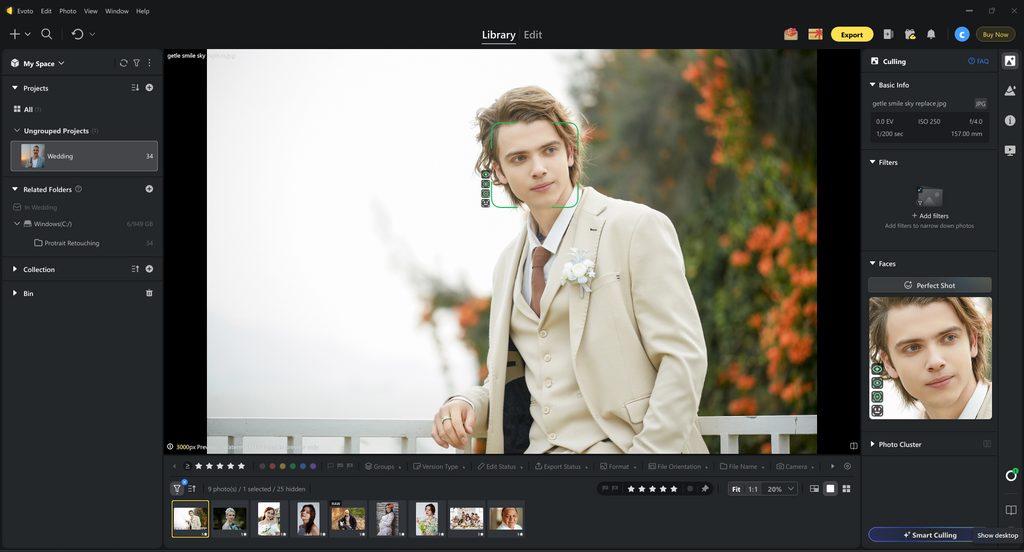
Evoto allows you to select multiple photographs and synchronise editing adjustments between them. You can also save your adjustments as presets and apply them to other images. You can find more information about Evoto’s batch-editing tools here.
The advantage is simple.
Instead of making the same adjustment repeatedly, you establish the look once and then apply it across the relevant group.
That doesn’t mean every photograph has to look identical. It means you’re not wasting time carrying out the same repetitive corrections over and over again.
Step 1: Establish your editing style
Before you start applying adjustments across a gallery, it’s worth deciding what you want the finished photographs to look like.
This is particularly important with wedding photography.
A client may have hundreds of photographs in their gallery, and they’ll naturally view those images together. If the colour and exposure jump dramatically from one photograph to the next, the gallery can feel disjointed.
Evoto includes a range of tools and looks designed to give photographers a starting point for their colour treatment, including options aimed at wedding photography.
The Evoto wedding photography workflow brings together several of the tools that can be useful when working with a large wedding gallery.
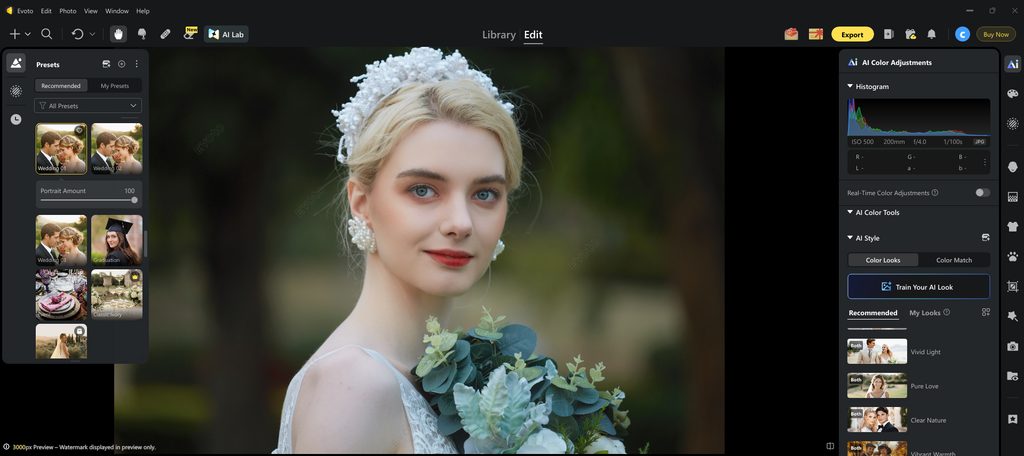
Of course, a preset shouldn’t dictate your entire editing style.
If you already have a recognisable look, you want the software to help you achieve that look more efficiently rather than replacing it.
That’s where the ability to adjust and refine the results becomes important.
Step 2: Deal with mixed lighting
This is probably one of the biggest challenges when editing a wedding.
A wedding photographer might start the day photographing preparations in a room lit by a mixture of window light and artificial lighting.
Then comes the ceremony.
Then you’re outside for the group photographs.
Perhaps the couple’s portraits take place in completely different light.
By the evening, you’re dealing with reception lighting, coloured lights and much lower levels of ambient light.
Trying to make every photograph look exactly the same isn’t realistic – and it isn’t necessarily desirable.
What you want is consistency while still allowing each photograph to look natural.
This is where Evoto’s AI Color Match becomes particularly interesting. Rather than manually trying to recreate the colour treatment from one photograph on another, you can use a photograph as a reference and allow Evoto to match the colour treatment.
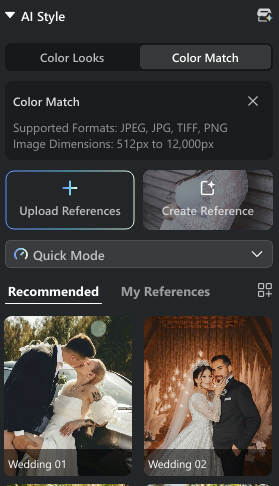
The key is choosing a sensible reference.
If you’ve got a beautifully balanced outdoor portrait, that doesn’t necessarily make it the right reference for a photograph taken inside a dark reception venue.
Instead, look for photographs that have similar lighting and surroundings.
For example, you might establish one reference for the preparations, another for the ceremony and another for the outdoor portraits.
That gives you a much more controlled approach.
Getting the colour match right
The useful thing about the colour-matching workflow is that you’re not simply applying a generic filter.
You’re starting with a photograph that already has the colour and feel you’re looking for.
Once the match has been applied, you can still refine the result.
That matters because no two wedding photographs are necessarily going to be identical.
One image might have more skin visible, another might contain a large area of greenery, while another could be dominated by the interior of a church or venue.
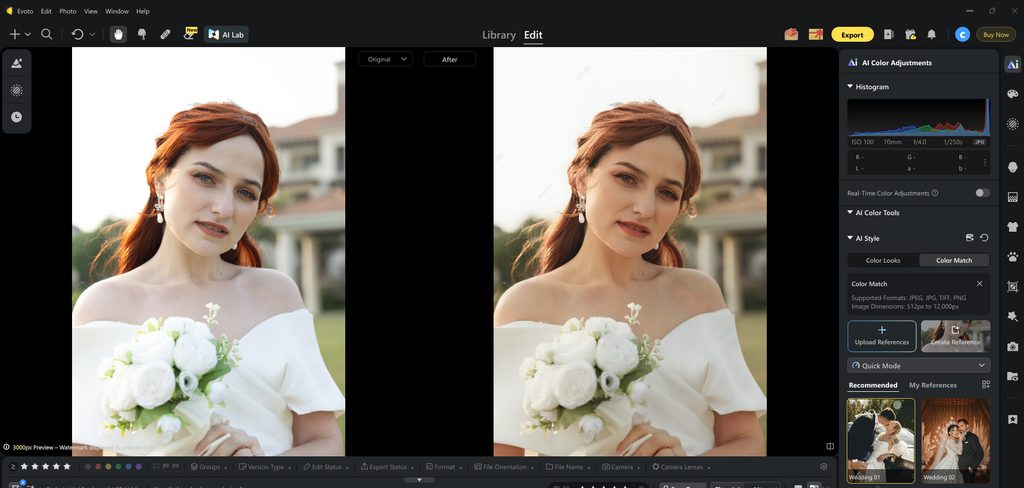
For a large wedding gallery, being able to establish a look and then carry that look across a group of photographs can remove a considerable amount of repetitive colour work.
Step 3: Batch edit the gallery
Once you’ve established the appropriate look, it’s time to apply it across the gallery.
This is where batch processing really starts to make sense.
Select the photographs that belong together, apply the adjustments you’ve established and then review the results.
You can synchronise selected adjustments between photographs rather than simply copying absolutely everything.
That can be useful when, for example, you want to carry over colour adjustments but don’t necessarily want to apply the exact same crop or other image-specific changes.
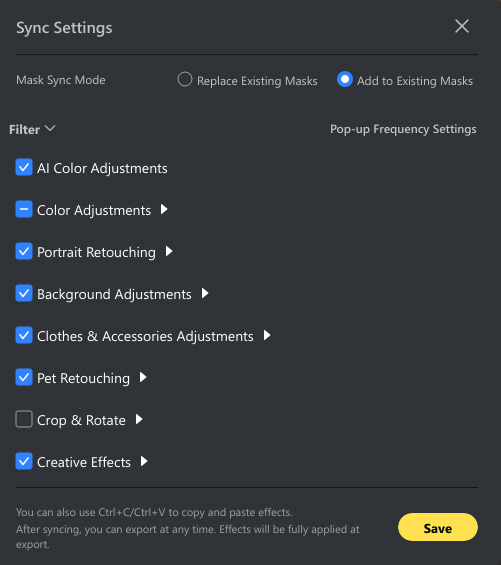
This is an important distinction.
Batch editing shouldn’t mean:
“Make every photograph the same.”
It should mean:
“Remove the repetitive work and give me a consistent starting point.”
You still need to look at the results.
And that’s where the real-world workflow becomes important.
Step 4: Give portraits the attention they deserve
Wedding photography isn’t just about colour and exposure.
People are the reason your clients hired you in the first place.
That means portrait retouching is another important part of the workflow.
Evoto includes AI-powered tools for portrait retouching, including skin, facial features, makeup and other subject adjustments.
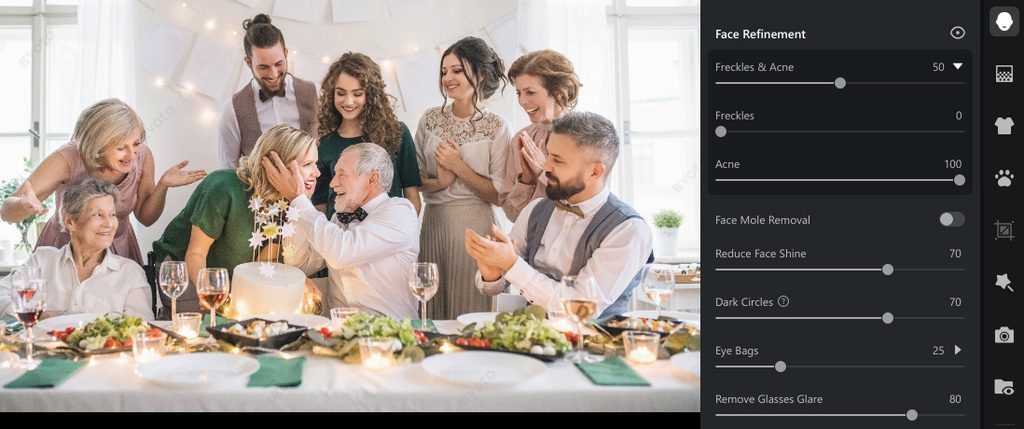
The temptation with any retouching tool is to keep pushing the sliders until the effect becomes obvious.
For wedding photography, we’d argue that subtlety is usually the better approach.
The bride and groom should still look like themselves.
Skin should retain texture.
Facial features shouldn’t be dramatically altered.
And the finished image should look like a professionally edited photograph rather than an obviously retouched one.
AI can take care of some of the repetitive work, but the photographer still needs to decide what looks right.
Step 5: Don’t batch edit everything
This might sound like a strange thing to say in an article about batch editing, but it’s important.
You shouldn’t necessarily batch edit everything.
There will always be photographs that deserve individual attention.
The hero portrait.
The photograph of the bride walking down the aisle.
The first kiss.
A particularly emotional moment between the couple.
The big family photograph.
The first dance.
These are the photographs where you may want to spend more time.
The advantage of speeding up the routine editing is that you have more time available for those important images.
Instead of spending ten minutes making the same basic adjustments to a large group of photographs, you can get the group into shape and then concentrate on the photographs that really matter.
That’s where we think AI editing makes the most sense.
It’s not about handing over the creative decisions.
It’s about reducing the amount of repetitive work standing between you and the finished gallery.
Step 6: Review the gallery as a whole
Once you’ve applied your batch adjustments, don’t immediately export everything.
Take a step back and look at the gallery as a complete collection.
This is particularly important with weddings because you’re dealing with such a wide range of environments.
Check for:
- Changes in skin tone
- Sudden shifts in colour
- Overly warm or cool images
- Exposure differences
- Images where the AI treatment looks too strong
- Portraits that need additional attention
- Photographs where the original lighting needs a more individual approach
The goal isn’t technical uniformity.
It’s a gallery that feels cohesive.
A photograph taken outside in bright sunshine shouldn’t necessarily have exactly the same tonal characteristics as one taken in a dark reception room.
They should simply feel as though they belong to the same wedding.
Step 7: Make your final individual adjustments
Once the bulk of the editing is complete, this is the opportunity to go back through the images that need a little more attention.
Perhaps a portrait needs some additional retouching.
Maybe one photograph has a slightly different colour cast.
Perhaps a group photograph needs a small exposure adjustment.
This is where having dealt with the repetitive work earlier in the process becomes valuable.
You’re no longer starting from scratch.
You’ve already established the overall look and brought the gallery together.
Now you’re refining it.
It’s a much more efficient way of approaching a large gallery because your time is being spent where it can make the biggest difference.
Step 8: Export the finished gallery
Once you’re happy with the results, it’s time to export.
The exact settings you choose will depend on how the photographs are going to be delivered.
A client gallery may require high-resolution JPEGs, while images prepared for social media will have very different requirements.
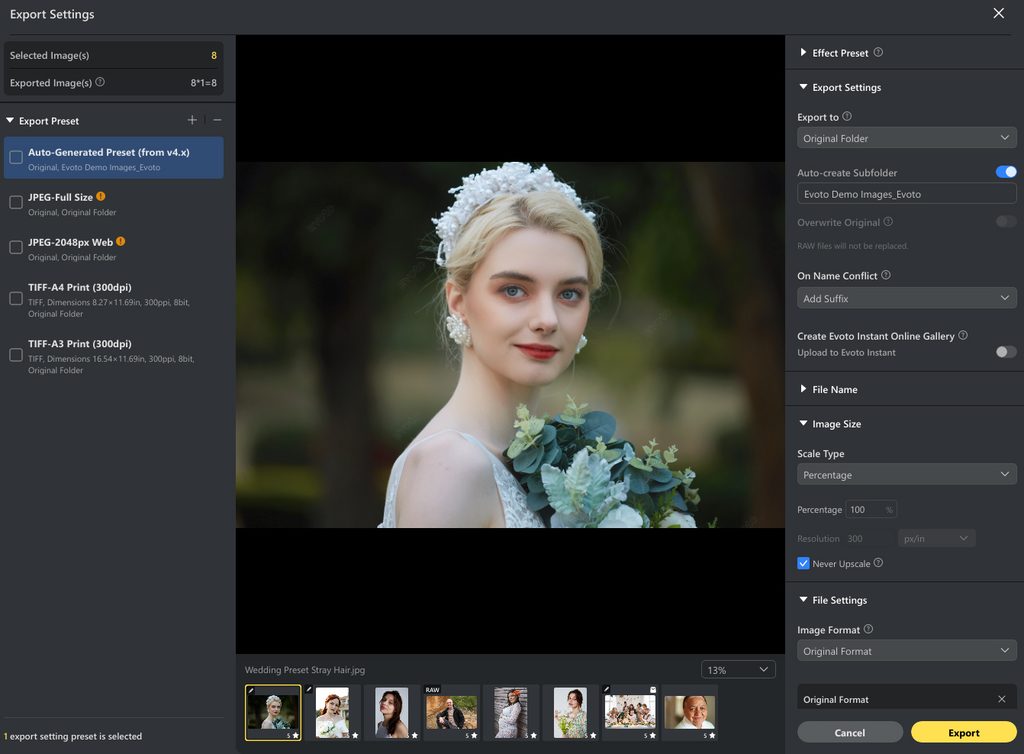
The important thing is that the export is the final stage of a workflow that has already dealt with the bulk of the repetitive editing.
You’ve established your look.
You’ve matched your colour.
You’ve batch processed the relevant groups.
You’ve retouched the important portraits.
You’ve individually refined the photographs that needed it.
Now you’re ready to deliver.
How much time can AI editing actually save?
That’s the question most photographers are likely to ask.
And there’s no single answer.
Every photographer works differently, every wedding is different and the amount of editing required will vary enormously.
The real benefit isn’t necessarily that AI will turn a four-hour editing job into a ten-minute one.
It’s that it can reduce the number of repetitive decisions and adjustments you have to make.
If you’re editing hundreds of photographs, even relatively small time savings per image can add up.
And perhaps more importantly, it can make the editing process feel less like a conveyor belt.
You establish the look.
You apply it to the appropriate images.
You check the results.
Then you concentrate on the photographs where your own judgement matters most.
Where Evoto fits into a wedding photographer’s workflow
The biggest takeaway from this type of workflow is that AI doesn’t have to replace the photographer.
In fact, we’d argue that it works best when it doesn’t.
The photographer remains responsible for the style, the final selection and the creative decisions.
Evoto simply provides tools that can help deal with some of the repetitive tasks involved in getting a large gallery finished.
Its combination of batch editing, colour matching and portrait retouching makes it particularly relevant to wedding photographers, where large numbers of people-focused images need to be processed consistently.
And that’s really the attraction.
Less time repeating the same adjustments. More time making the important photographs the best they can be.
Our recommended wedding editing workflow
If you’re dealing with a large wedding gallery, a sensible approach is:
1. Import the gallery
Get the complete collection into your editing workflow.
2. Group similar photographs
Separate images according to lighting, location or part of the wedding day.
3. Establish your look
Choose your starting point and make the adjustments that reflect your own style.
4. Colour match where appropriate
Use a strong reference photograph to bring similar images together.
5. Batch process
Apply the appropriate adjustments to groups of photographs rather than repeating them individually.
6. Retouch portraits
Use AI tools where they make sense, but keep the results natural.
7. Refine your hero images
Spend more time on the photographs that matter most.
8. Review the complete gallery
Check consistency before exporting.
9. Export and deliver
Create the files required for your client, album or online gallery.
Frequently Asked Questions
Can you batch edit wedding photos with AI?
Yes. AI-powered editing software can apply adjustments across multiple photographs, making it possible to process large sections of a wedding gallery without repeating the same edits manually.
How do you batch edit a wedding gallery?
Start by grouping photographs with similar lighting and conditions. Establish the look you want for each group, apply the appropriate adjustments across the selected images and then review the results individually before completing the gallery.
Can Evoto match the colour of wedding photographs?
Yes. Evoto’s AI Color Match allows you to select a reference photograph and use its colour treatment as the basis for other images. This can be particularly useful when working with photographs captured in different lighting conditions.
Is AI retouching suitable for wedding photography?
It can be, particularly for repetitive portrait adjustments. The important thing is to keep the results natural. AI should help you work more efficiently rather than making every person in the wedding gallery look heavily retouched.
Should I apply the same preset to an entire wedding?
Not necessarily. Different parts of a wedding are often photographed in very different lighting. Establishing several looks for different sections of the day can produce a more natural and consistent result than forcing one treatment across the entire gallery.
Can AI replace a wedding photographer’s editing style?
AI can help reproduce and apply a particular editing treatment, but the photographer should remain in control of the creative direction. The best results come from using AI to reduce repetitive work while retaining your own judgement over the final images.
Is batch editing suitable for large wedding galleries?
This is where batch editing can be particularly useful. Wedding photographers can be dealing with hundreds or thousands of images from a single event, making repetitive adjustments one of the biggest time-consuming parts of the workflow.
Does batch editing mean every photograph will look identical?
No. The aim is consistency rather than uniformity. Different lighting conditions and subjects still need to be considered, and individual images can be refined after the batch adjustments have been applied.
Final thoughts
Wedding photography is about telling the story of a day.
The editing process shouldn’t get in the way of that.
When you’re dealing with hundreds or thousands of photographs, the challenge is finding the balance between working efficiently and giving the important images the attention they deserve.
That’s where tools such as Evoto can be useful.
By using AI to deal with repetitive editing tasks, match colour, apply adjustments across groups of photographs and assist with portrait retouching, you can potentially reduce the amount of time spent doing the same thing again and again.
But the final creative decisions remain yours.
And perhaps that’s the most useful way to think about AI editing.
Don’t use it to replace your creativity. Use it to give you more time to use it.