AI in Photography: How Photographers Can Use Generative AI
Artificial intelligence is changing photography at a remarkable pace. For photographers, AI can be exciting, useful and occasionally concerning — and knowing how to use it effectively is becoming increasingly important.
Professional photographer Steve Allen shares his experience of taking his first steps into generative AI, using Adobe Photoshop to create, expand and enhance images.
This is Steve’s personal experience and opinion based on his early experiments with AI. AI tools and the policies of stock agencies and photographic organisations continue to evolve.
My first steps into AI
I’m new to AI.
Over the past few months, I’ve been taking my first tentative steps into this technology, which is going to affect all of us involved in photography.
Whether you like it or not, AI isn’t going away. It can’t be uninvented, and the technology is developing incredibly quickly.
If you decide that AI has no place in photography and simply ignore it, there’s a danger that you’ll get left behind. That doesn’t mean that every photographer needs to become an AI specialist, but I think it’s important to understand what the technology can do and decide for yourself how — or whether — it fits into your workflow.
My own experiments have been relatively limited. I’ve mainly been using the AI tools built into Adobe Photoshop rather than specialist AI image-generation software.
When Adobe first launched the beta version of Firefly, I wasn’t particularly impressed. However, the improvements came quickly. New versions and updates appeared regularly, and the quality of the generated content improved considerably.
It soon became apparent that this was a technology worth taking seriously.
What can AI do for photographers?
One of the most useful aspects of generative AI, at least for my own work, isn’t creating an entire photograph from nothing.
Instead, I’ve found it particularly useful for enhancing, expanding and combining my original photographs.
AI can help with tasks such as:
- expanding the edges of an image
- extending a landscape into a panoramic composition
- replacing or creating skies
- removing unwanted elements
- filling areas of an image
- blending photographs together
- creating additional background areas
- generating elements that would be difficult or time-consuming to photograph
- creating entirely artificial images from text prompts
For me, the ability to extend an existing photograph has been particularly valuable.
Creating a completely AI-generated image
My first experiment was to see whether I could create an image entirely using AI.
I opened a new Photoshop document at 20 × 16 inches and 300 DPI. The resulting document was approximately 82 MB.
I then selected the image area and used text prompts to describe the scene I wanted.
My starting prompt asked for:
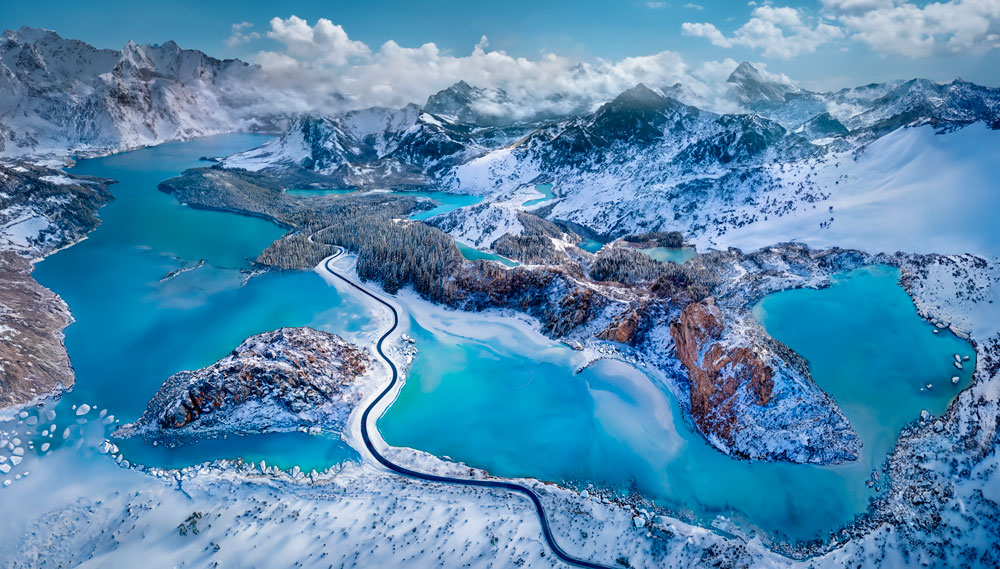
“A high-level aerial view of a mountainous landscape like northern Canada, with partly frozen lakes, a partly cloudy sky and a road running into the landscape from the bottom edge.”
The first variations weren’t particularly useful, so I kept generating alternatives.
Eventually I found elements that I could work with. The road and part of the lake were useful, so I enlarged this area to fill more of the frame.
I then used Photoshop’s generative expansion tools to extend the image along the top and both sides.
Again, it was a process of generating multiple variations, rejecting most of them and keeping the elements that worked.
(see hreo image)
Building the image piece by piece
At this point I had the basic landscape, but there were still many areas that didn’t look right.
Using the Lasso tool, I selected individual areas and generated new content, either by supplying another text prompt or simply allowing Generative Fill to produce alternatives.
The final image contained approximately 80 separate generative selections.
I also used conventional Photoshop tools to finish the photograph.
The whole process took approximately three hours.
The resulting image was captioned:
AI-generated image – aerial image of an Alpine landscape that could be northern Canada or the European Alps.
The problem with resolution
There was another reason for starting with such a large Photoshop document.
Generated imagery has historically presented problems with resolution and fine detail. Even after sharpening and other processing, I found that some generated images weren’t initially of sufficient quality for my stock photography work.
Working on a large document gave me the ability to produce a final image at a more manageable size while retaining sufficient apparent detail.
There is, however, a significant downside.
As I expanded the image and added more generative layers, the working file became enormous.
At one point the Photoshop document had grown to around 460 MB, while the associated scratch-disk data exceeded 2.9 GB.
My computer slowed dramatically.
Eventually I had to flatten the image, save it as a TIFF, close Photoshop and restart it to clear the scratch-disk data before continuing.
It’s an important reminder that generative AI isn’t necessarily a lightweight addition to a photographic workflow.
Using AI to enhance existing photographs
Although I’ve created some completely AI-generated images, this isn’t how I use AI most often.
I find it considerably more useful when I start with my own photographs.
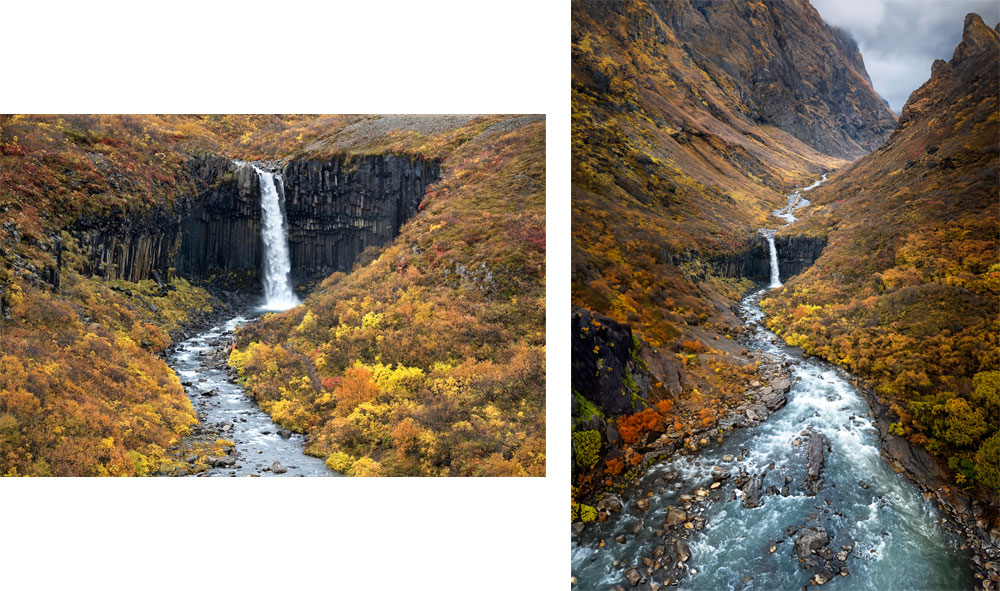
One example is a photograph of Svartifoss, the famous waterfall and basalt formation in Iceland.
I placed my original photograph into a new 20 × 16-inch, 300 DPI document and enlarged it to fill the frame.
I then used generative expansion to extend the image beyond its original boundaries.
I could work on each side independently, using either text prompts or Generative Fill to create the additional landscape.
If an area wasn’t convincing, I simply selected it and generated another version.
This produced the final image, which I captioned:
Waterfall in a Mythical Landscape.
The ability to experiment with different versions is one of the things I find particularly useful about AI.
However, there is also a danger of endlessly changing an image.
Knowing when to stop is important.
There’s always the temptation to try “just one more” variation, and eventually you can end up making an image worse rather than better.
Creating panoramic photographs with AI
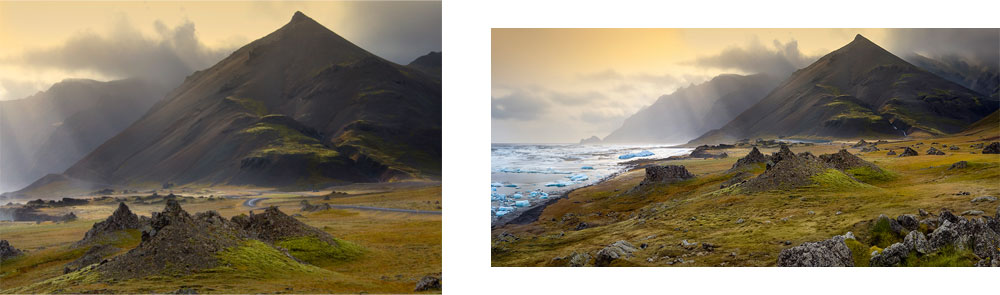
I’ve also used generative expansion to turn conventional photographs into much wider panoramic compositions.
For example, an original photograph of the volcanic landscape at Skaftafell in Iceland was expanded to reveal considerably more of the surrounding landscape and coastline than was visible in the original photograph.
I’ve used a similar approach with photographs from locations including:
- Banff National Park in Canada
- Patagonia, Chile
- Iceland
- Tibet
- French Polynesia
In some cases, the AI-generated areas make up a relatively small part of the final photograph. In others, entire sections of the finished composition have been generated.
This can save an enormous amount of time compared with creating the same effect using conventional Photoshop compositing techniques.
Removing unwanted people and objects
Another practical application is removing unwanted elements from an existing photograph.
I used AI to expand a photograph of Machu Picchu in Peru while also removing two people from the original image.
This was particularly useful for my stock photography because I didn’t have model releases for the people in the foreground.
Previously, removing people convincingly could involve considerable cloning and retouching work.
Generative AI can make this process much faster, although the result still needs to be checked carefully.
AI-generated areas can contain subtle mistakes, repeated patterns or details that don’t make sense.
The photographer still needs to make the final judgement.
Blending multiple photographs with AI
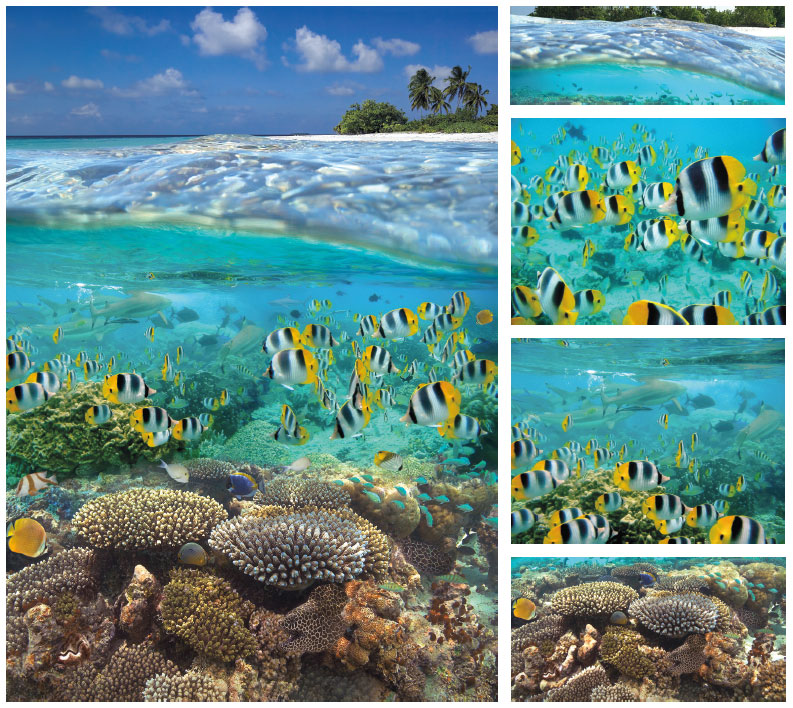
Another area where I’ve found AI particularly useful is combining photographs.
One underwater image I created was made from five original photographs, blended together using AI.
The sky and palm trees were generated using AI, while much of the underwater scene came from my original photographs.
I’ve also used similar techniques with photographs of landscapes and architecture.
For example, photographs of:
- Bow Lake in Banff National Park
- Laguna San Rafael in Patagonia
- Goðafoss in Iceland
- Gyantse Dzong in Tibet
were expanded, blended or reconstructed using a mixture of my original photographs and generative AI.
Some of these images could certainly have been produced using traditional Photoshop compositing.
However, the conventional approach would have taken considerably longer, and in some cases I doubt I could have achieved such convincing blends as easily.
AI is improving rapidly
One thing that has surprised me is how quickly the technology has improved.
Initially, I found that images containing buildings often produced poor results. Architectural details didn’t always look believable, so I concentrated mainly on landscapes.
I recently returned to the idea of creating an image containing numerous buildings to see how much things had improved.
The difference was considerable.
This Florence skyline image was created by blending two photographs, expanding the image and replacing the sky.
The result was much more convincing than my earlier experiments.
That leads to an obvious question:
What will AI be capable of in another year or two?
It’s difficult to predict.
The rate of development means that techniques which seem difficult today may become routine very quickly.
AI and stock photography
Stock photography is particularly important to me because it has been my primary source of income for many years.
Consequently, the response of stock agencies to AI is something I’ve been watching closely.
Many agencies have chosen to embrace AI rather than attempt to ignore it.
Their policies vary, but some agencies now accept AI-generated or AI-enhanced images provided contributors identify them correctly and follow the relevant submission and keywording requirements.
This is extremely important.
If you’re submitting AI-assisted images to a stock agency, always check its current rules.
Policies can change, and the requirements for fully generated images may differ from those for photographs that have been enhanced or expanded using AI.
Photographers should never assume that an image accepted by one agency will automatically be acceptable to another.
AI training and photographers
Another development has been the way some stock agencies are approaching AI training.
Some agencies have introduced schemes allowing contributors to opt in to the use of their images for AI training, with compensation linked to the contributor’s portfolio.
This is an interesting development because it potentially creates another source of income for photographers whose work is being used in the development of AI systems.
At the same time, the question of copyright remains highly contentious.
Photographers understandably want to know how their work is being used, whether they have given permission and whether they should be compensated.
These questions are still evolving alongside the technology.
Should photographers be worried about AI?
I think the answer depends heavily on the type of photography you do and the market you work in.
AI is already extremely capable of creating and manipulating landscapes, backgrounds and environments.
In the right hands, it can also be used effectively for product and commercial photography.
We’ve also seen the controversy surrounding deepfake images and the ability of AI to create convincing images of real people.
But I don’t believe that every area of professional photography is going to be affected in the same way.
For example, wedding and portrait photographers are still providing something very different from a generated image.
Their clients aren’t simply buying pixels.
They’re hiring a photographer to be there, interact with people, make decisions, capture genuine moments and produce a record of something that actually happened.
People still want reality.
As photographers, I believe that’s something worth remembering.
AI as another photographic tool
For me, AI has increasingly become another image-manipulation tool.
Photography has always evolved.
We’ve moved from film to digital cameras, from darkrooms to Photoshop and from manual retouching to increasingly sophisticated software.
Generative AI represents another significant step.
That doesn’t mean that photographers have to use it to create completely artificial photographs.
In my own workflow, I’m much more interested in using AI to make my original photographs more useful.
It can allow me to:
- expand an image when I don’t have enough room in the original frame
- create a wider composition
- remove unwanted elements
- combine photographs
- experiment with different environments
- create stock images that would previously have required additional photography
- speed up repetitive compositing and retouching work
The key is understanding what you’re creating and being honest about how you created it.
AI, photography competitions and qualifications
This is one of the most difficult areas.
Almost from the beginning of the AI revolution, photographers began submitting AI-generated or AI-assisted images to competitions.
In some cases, AI-generated images have even won photographic competitions.
That creates a serious challenge for organisations running competitions and photographic qualification systems.
The fundamental question is:
What constitutes a photograph?
If a photographer captures an original image and uses AI to remove an object, is that still a photograph?
What if the photographer expands the background?
What if half of the image is generated?
What if the entire image is generated from a text prompt?
There isn’t a single answer that works for every competition.
Some organisations have chosen to prohibit generative AI entirely.
Others have adopted rules that permit limited AI enhancement, provided the photographer can demonstrate that the majority of the original image was captured photographically.
Whatever approach an organisation chooses, policing the rules is likely to become increasingly difficult.
Judges need to be able to distinguish between conventional photographic manipulation and AI-generated content, while photographers need to understand exactly what is permitted under the rules of each competition or qualification.
For photographers entering competitions, always read the current rules rather than relying on what was permitted in a previous year.
The importance of transparency
As AI becomes more sophisticated, transparency is likely to become increasingly important.
Photographers should consider:
- Was the image generated entirely by AI?
- Was an original photograph used?
- Which elements were generated?
- Has the image been substantially altered?
- Does the intended market permit that type of manipulation?
- Does the competition or qualification allow it?
- Does the stock agency require AI disclosure?
These aren’t merely technical questions.
They can affect copyright, licensing, competition eligibility, commercial use and the expectations of clients.
Will AI replace photographers?
I don’t think the future is as simple as AI replacing photographers.
Instead, I think we’re likely to see a mixture of photography and AI becoming increasingly normal.
Some photographers will use AI extensively.
Others will use it only for minor retouching.
Some will choose not to use generative AI at all.
There will also continue to be markets where authenticity and the fact that something was genuinely photographed are fundamental to the value of the image.
What will change is the definition of what a photographer can produce.
A photographer who understands lighting, composition, perspective, colour and visual storytelling already has many of the skills needed to use AI effectively.
AI may provide the raw materials or technical assistance, but somebody still needs to decide what the finished image should look like.
My advice to photographers
I’m still very much learning.
I’ve only scratched the surface of what AI can do, and I’m sure that many photographers are already producing results considerably more sophisticated than mine.
But I would encourage photographers not to dismiss the technology simply because it feels unfamiliar.
Experiment with it.
Find out what it can and can’t do.
Try using AI with your own photographs rather than immediately attempting to create everything from scratch.
And most importantly, learn to recognise its limitations.
AI can produce remarkable results, but it can also produce things that look convincing at first glance and make absolutely no sense when you examine them closely.
The photographer’s judgement remains critical.
Photography is at a crossroads
Whatever your personal opinion of AI, the photographic industry is at a crossroads.
The changes we’re seeing could prove to be at least as significant as the transition from film to digital.
Some photographers will embrace AI.
Some will resist it.
Others, like me, will probably find a middle ground.
Personally, I’m not particularly worried about it.
For me, AI is another way of producing saleable stock images and enhancing photographs I’ve already taken.
But I also understand why many photographers have concerns about copyright, authenticity, competition rules and the future of professional photography.
The technology will continue to develop whether we like it or not.
We ignore AI at our peril.