AI Translation for Websites and Publications: A Practical Guide
By Mike McNamee
Artificial intelligence has made high-quality translation far more accessible. Tools such as DeepL and ChatGPT can now translate website content, articles and documents in a fraction of the time and cost traditionally associated with professional translation.
For photographers, publishers and creative businesses, this creates an interesting opportunity: content that was previously available only in English can potentially be adapted for audiences around the world.
However, AI translation is not a completely hands-off process. The quality of the original text, the language being translated, specialist terminology and even the fonts used in a document can all affect the final result.
So how can photographers and publishers make the most of AI translation without losing accuracy or professionalism?
Why use AI for translation?
Professional translators remain essential, particularly for important commercial, legal and specialist material. However, the cost of translating large quantities of content into several languages can make multilingual publishing difficult for smaller organisations.
AI can take on much of the initial work.
A typical workflow might involve:
- Writing and editing the original English content.
- Translating the content using an AI translation tool.
- Reviewing the translated version.
- Asking a native speaker to check the final text.
- Formatting the translated content for the website, PDF or publication.
This can dramatically reduce the amount of work required from a professional translator or native-language reviewer.
For a small website update or short article, AI translation may be sufficient with appropriate checking. For a substantial publication, however, human review remains extremely important.
DeepL and AI translation
DeepL has become one of the best-known AI translation services and is particularly interesting for publishers because its translation technology is designed specifically around language translation.
ChatGPT can also translate text and has the advantage of supporting a very wide range of languages and being able to work with surrounding instructions and context.
The choice between translation tools depends on the languages involved, the type of content and the workflow being used.
Rather than assuming that one system will always produce the best translation, it is worth testing the actual content you intend to publish.
This is particularly important with specialist photography, architectural, technical or historical terminology.
A translation can be grammatically excellent while still getting a specialist term completely wrong.
AI translation is not a substitute for a native speaker
One of the most important lessons from multilingual publishing is that a technically impressive translation can still contain errors that are obvious — or potentially embarrassing — to a native speaker.
This is especially true with:
- Names
- Places
- Historical references
- Technical terminology
- Idioms
- Colloquialisms
- Brand names
- Art and architectural terms
A good workflow is therefore to regard AI as the first stage of translation rather than the final authority.
The AI does the heavy lifting; a fluent native speaker provides the final quality control.
This is particularly important when translating material that will be printed, permanently published or distributed commercially.
Translating a website with AI
For website owners, AI translation can make multilingual content considerably easier to produce.
Instead of commissioning every article individually, you can establish a repeatable workflow:
English article → AI translation → human review → website publication
The English version should always be treated as the master copy.
Keep a record of the original and translated versions so that future changes can be made consistently. If an article is updated in English, the corresponding foreign-language versions should also be reviewed.
It is also worth remembering that a good website translation is more than replacing one word with another.
Headings, navigation, buttons, captions, image descriptions and metadata may all need translating.
If you are creating dedicated pages for different languages, consider the search behaviour of people in those markets as well. A literal translation of an English page title is not necessarily the phrase that people would use when searching in another language.
Designing multilingual publications
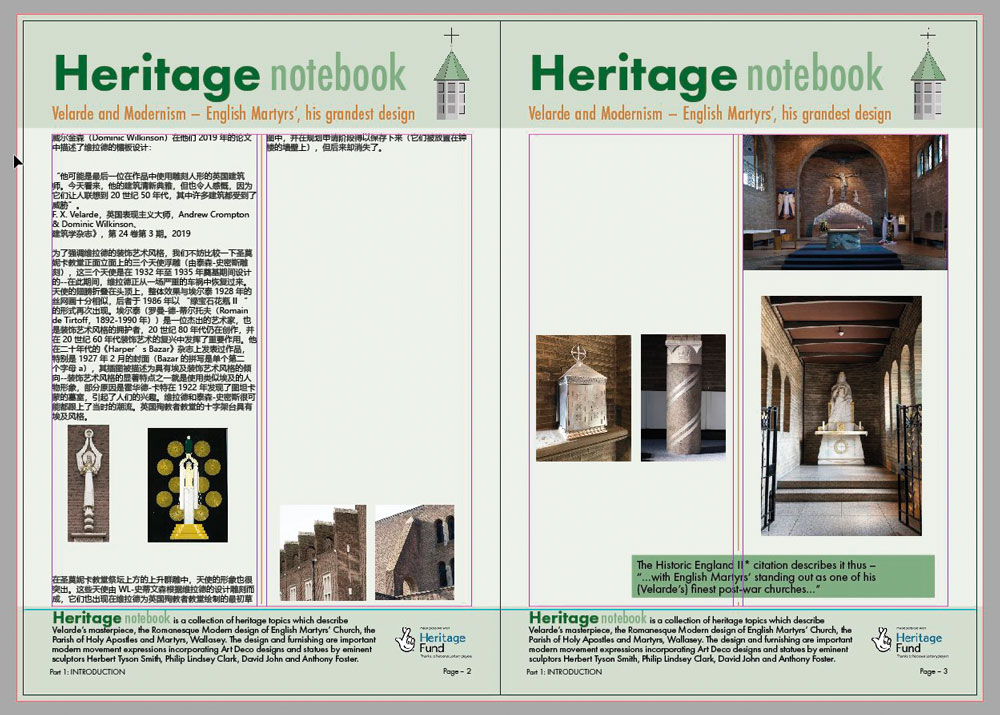
Translation becomes more complicated when the text is part of a designed document.
A paragraph that occupies four lines in English might occupy considerably more — or considerably fewer — lines after translation.
This means multilingual publications should be designed with expansion and contraction of text in mind.
Adobe InDesign is particularly useful for this type of work because different language versions can be managed using separate text or layer structures while retaining the same underlying page design.
A practical approach is to keep common elements such as:
- Images
- Logos
- Page furniture
- Page numbers
- Background graphics
separate from the language-specific text.
This makes it easier to switch between languages and export the appropriate version.
Allow for text expansion
Different languages can require very different amounts of space.
For example, German can be considerably longer than English in some circumstances, while other languages can be more compact.
French, Spanish and Portuguese can also expand compared with English, while some Scandinavian languages may contract.
The exact difference depends heavily on the text, so fixed percentages should be treated as a guide rather than a rule.
The important lesson is to leave enough flexibility in your design.
If a page is already packed tightly with text, even a modest expansion can cause problems with headings, captions and image placement.
One useful approach is to design the English version with enough space that the translated text can be accommodated without completely redesigning the page.
Choosing fonts for multilingual documents
Fonts are another important consideration.
A font that works perfectly for an English publication may not contain the characters required for another language.
This becomes particularly important when working with languages that use different writing systems, such as Chinese, Japanese or Korean.
A font needs to contain the appropriate glyphs for the language being used.
Some specialist display fonts have relatively limited character sets. They may look fantastic in an English headline but contain no usable characters for another writing system.
For multilingual publications, it is therefore sensible to test your chosen fonts with the actual translated content before committing to the design.
Fonts such as the Source Han and Noto families can provide broad language support, although the exact requirements depend on the languages being produced.
Don’t assume that because a font contains accented European characters it will automatically support every language you need.
Names and specialist terminology need particular care
AI translation can struggle with words that have different meanings depending on context.
This becomes particularly noticeable in specialist subjects.
Photography, architecture, art and design all contain terminology that may not have a simple one-to-one translation.
A good example is the term Art Deco.
The historical movement has different terminology and associations in different countries, and a literal translation may not always be the term normally used by specialists in that language.
Names can also cause problems.
Translation software may attempt to transliterate a person’s name into another writing system or interpret it as an ordinary word.
For publications containing historical figures, photographers, artists, architects or locations, names should therefore be checked carefully.
Formatting translated documents
Another challenge is transferring translated text back into a designed document.
Depending on the translation method and software being used, formatting such as:
- Page breaks
- Column breaks
- Line breaks
- Special characters
- Text styles
may not always survive the process exactly as intended.
If your translation workflow does not preserve the original formatting, it can be useful to establish a simple system for marking important breaks before sending the text for translation.
For example, distinctive markers can be inserted to indicate where a page or column ends. These can then be replaced with the correct InDesign formatting afterwards.
This is less elegant than a fully integrated document-translation workflow, but it can work well for smaller projects.
Always check the translated text
Perhaps the most important rule is simple:
Never assume that an AI translation is perfect just because it reads naturally.
A translation can look fluent while subtly changing the meaning of the original.
Errors involving names, historical references or specialist terminology can be particularly difficult to spot if you don’t speak the target language.
Ideally, the final version should therefore be checked by someone who is fluent in the language and, preferably, understands the subject matter as well.
A native speaker who knows photography will be much better placed to review a photography article than somebody who simply speaks the language.
AI translation and professional translators
AI translation doesn’t necessarily mean the end of professional translation.
In many cases, it changes the role of the translator.
Instead of translating every sentence from scratch, a professional can review an AI-generated draft, correct terminology, improve the language and ensure that the finished publication sounds natural.
This can make professional translation more efficient while retaining the human expertise needed for high-quality publishing.
For simple, low-risk website content, AI may provide an inexpensive way of reaching additional audiences.
For important publications, commercial material and specialist documents, human review remains the safer approach.
A practical multilingual publishing workflow
For photographers, publishers and creative organisations looking to experiment with AI translation, the following workflow provides a useful starting point:
1. Create a high-quality English original
The better your original copy, the better the translation is likely to be.
Avoid unnecessary jargon, ambiguous wording and unexplained abbreviations.
2. Translate the content using an AI tool
Use a reputable translation system and provide enough context for specialist terminology.
3. Keep the original formatting structure
Make headings, captions and sections easy to identify so that they can be reconstructed in the final document.
4. Check names and technical terms
Pay particular attention to people, places, organisations, photography terminology and historical references.
5. Have the translation reviewed
A fluent native speaker should check the finished text wherever accuracy matters.
6. Format the translated version
Test the translated text in the final website, PDF or InDesign document rather than assuming that the English layout will work unchanged.
7. Proofread the finished publication
Check the actual designed document or live webpage. Errors can be introduced during formatting even when the translation itself was correct.
The future of AI translation
AI translation is developing rapidly.
The technology can already produce remarkably natural translations, but the remaining problems are often the ones that matter most in professional publishing: context, terminology, cultural references and subtle changes in meaning.
For photographers and publishers, the most useful way to view AI translation is therefore not as a replacement for language experts, but as a powerful tool for reducing the amount of repetitive work involved in producing multilingual content.
For a short website article, that may mean translating content that would otherwise have remained available only in English.
For a large publication, it could mean giving a professional translator a much more advanced starting point.
Either way, the combination of AI translation and human expertise offers a practical route towards making photography and publishing content accessible to much wider international audiences.