Affinity for Photographers: A Powerful Free Alternative to Adobe
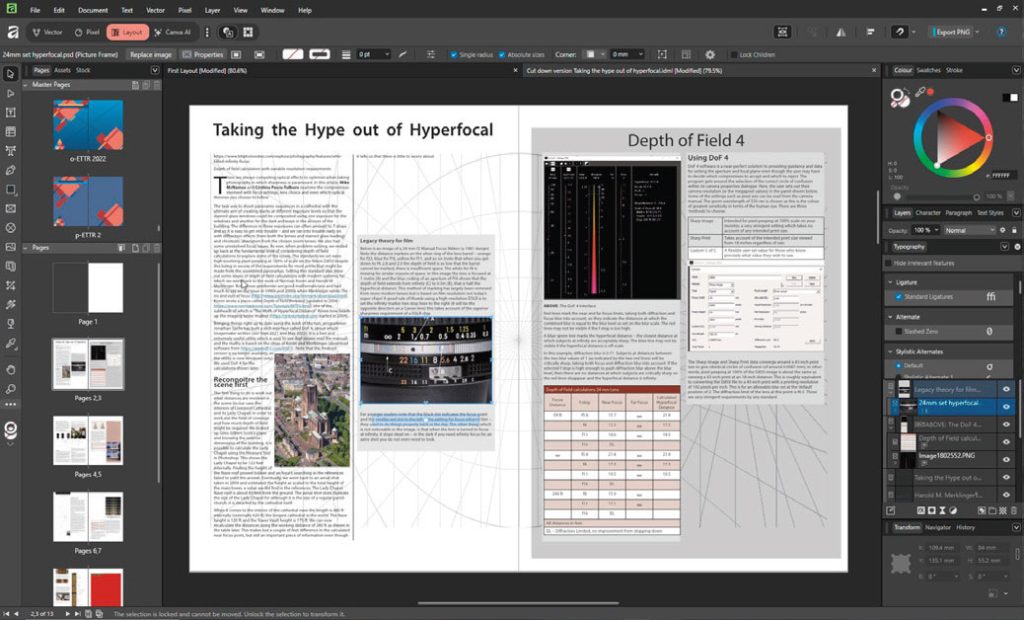
Affinity has always been an interesting alternative to Adobe’s creative software, but the proposition has changed dramatically. Following Canva’s acquisition of Affinity, the software is now available completely free of charge, giving photographers access to professional tools for photo editing, vector graphics and page layout without a subscription.
For photographers who have previously avoided professional design software because of cost or complexity, that could be a significant change.
What is Affinity?
Affinity brings together three areas of creative work that photographers often encounter: pixel-based image editing, vector graphics and page layout.
Rather than needing separate applications for each task, the software allows users to move between these different areas of work within the same application.
For a photographer, that opens up some useful possibilities.
You might edit a photograph, create a vector logo or graphic, and then use the same application to design a brochure, leaflet, portfolio or other piece of promotional material.
That flexibility is particularly interesting for photographers running their own businesses.
Affinity is now free
One of the biggest changes is the price.
Canva says the new Affinity is completely free, forever, with the full professional experience available to everyone.
That puts it in a very different position from Adobe’s professional creative applications.
Adobe InDesign, for example, is currently offered as a subscription product. In the UK, Adobe lists InDesign at £21.98 per month including VAT on its annual, billed-monthly plan.
For an established professional designer, software costs may simply be part of doing business. For a photographer who occasionally needs to produce a brochure, price list, promotional leaflet or portfolio, however, paying for specialist layout software can be harder to justify.
A capable free alternative changes that calculation.
Why photographers should care about page layout
Photographers often become highly proficient with image editing software but overlook the benefits of proper page-layout software.
It is easy to fall back on familiar applications such as Microsoft Word when producing a simple flyer or document. The problem is that word processors are designed primarily for handling text rather than giving you precise control over the position and relationship of visual elements.
Dedicated layout software works differently.
Images, text boxes, graphics and other elements can be positioned independently on the page. This makes it much easier to create consistent layouts and produce professional-looking printed material.
For photographers, that can be useful for everything from marketing leaflets and price guides to exhibition material, portfolios and printed promotional literature.
Three creative tools in one
One of the most interesting aspects of Affinity is the ability to move between different types of creative work without constantly switching applications.
Pixel editing
The Pixel tools are the most familiar territory for photographers.
Affinity’s pixel-based editing environment provides tools for manipulating photographs, making selections, retouching images and carrying out other forms of image editing.
Photographers already familiar with Affinity Photo should find this part of the application relatively straightforward.
Vector graphics
Vector graphics work differently from photographs.
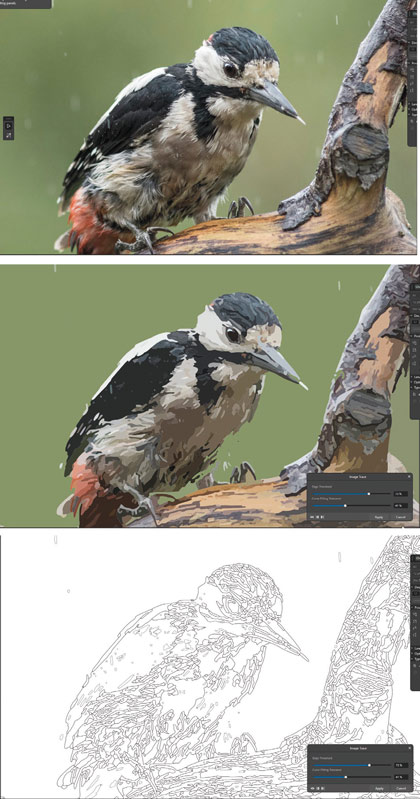
Rather than being constructed from individual pixels, vector artwork is based on mathematically defined shapes. This means it can be enlarged or reduced without losing image quality.
That makes vector graphics particularly useful for logos, diagrams, icons and other artwork that may need to appear at different sizes.
For photographers, this can be useful when creating branding, promotional graphics or artwork for print.
Affinity also includes image-tracing capabilities, allowing raster images to be converted into vector artwork.
Page layout
The layout tools are perhaps the most interesting area for photographers who have never used dedicated publishing software.
A photographer producing a brochure or portfolio can combine photographs, text and graphics within the same document, giving much greater control over the final design.
The original Imagemaker testing process used Affinity to create complete magazine spreads, including typography, grids, colour themes and placed photographs.
That sort of real-world test is important because software can look impressive in a feature list while becoming frustrating when used for an actual job.
How does Affinity compare with Adobe?
Affinity isn’t simply a replacement for every Adobe application.
Adobe has had decades to develop applications such as Photoshop, Illustrator and InDesign, and those applications remain extremely sophisticated tools.
InDesign, for example, is specifically designed for professional page layout and publishing, including books, brochures, digital magazines and other long-form documents. Adobe continues to add new features to the application.
For professional designers working with large publications, complex documents, established workflows and extensive automation, there are still reasons to choose Adobe.
But that doesn’t mean every photographer needs Adobe.
If you need to create a brochure, design a portfolio, manipulate an image or produce some vector artwork, having a capable free application available removes a significant barrier.
The end of the subscription problem?
This is where the wider issue of “enshittification” comes into the discussion.
The deliberately unpleasant term, coined by writer Cory Doctorow, describes a process in which products or services become progressively worse for users as companies attempt to maximise revenue.
The argument is particularly relevant to software because photographers and designers have increasingly moved from buying software outright to paying ongoing subscriptions.
Adobe’s subscription model is now firmly established. There is nothing inherently unusual about paying for software as a service, particularly when that money supports continuous development, cloud services and new features.
The question for users is whether the value they receive justifies the continuing cost.
Affinity takes a very different approach by making its professional software available free of charge.
That makes it particularly interesting at a time when photographers are already managing subscriptions for editing software, cloud storage, website hosting, galleries and other business services.
Is Affinity worth learning?
For photographers who only ever edit photographs and have no interest in graphic design or publishing, there may be little reason to change an established workflow.
But if you regularly create your own marketing material, there is a strong argument for learning at least the basics of page layout and vector graphics.
Understanding how to position images, work with typography, use grids and create consistent visual identities can make a significant difference to the quality of your marketing.
The fact that Affinity is now free makes experimenting with those skills considerably easier.
There is no need to commit to another monthly subscription simply to discover whether layout design is something you want to learn.
A genuine alternative for photographers
The most interesting thing about Affinity isn’t necessarily that it will replace Adobe.
It is that photographers now have access to a professional creative toolkit without having to pay for it.
For someone already working professionally with Adobe, that may not be enough reason to change.
For someone who has always wanted to learn page layout, vector graphics or more advanced image editing but didn’t want another subscription, however, Affinity is a much more compelling proposition.
And that may ultimately be its biggest impact.
The best software isn’t necessarily the one with the longest feature list. Sometimes it is the software that removes the barrier between having an idea and being able to create it.
With Affinity now free, there is very little stopping photographers from finding out what they can do with it.