
DxO PhotoLab 8 Review: A Powerful RAW Photo Editor
DxO PhotoLab has built a strong reputation among photographers for its sophisticated RAW processing, particularly its noise reduction and optical correction technology. With PhotoLab 8, DxO combines those strengths with a comprehensive set of editing tools and an integrated photo library.
For photographers looking for a powerful alternative to subscription-based editing software, PhotoLab 8 is an interesting proposition.
What is DxO PhotoLab 8?
DxO PhotoLab 8 is RAW photo processing and editing software designed to give photographers extensive control over their images while making use of DxO’s camera and lens testing data.
It supports RAW files from a wide range of cameras and combines conventional editing controls with DxO’s automated optical corrections, sharpening and noise reduction.
One particularly useful feature is the way PhotoLab handles camera and lens combinations.
When a supported camera and lens combination is recognised, PhotoLab can download the appropriate DxO optical module. These modules are specific to individual camera and lens combinations and are designed to compensate for characteristics and imperfections identified through DxO’s testing.
This can include corrections for optical sharpness and other lens-related characteristics.
PhotoLibrary: organising your photographs
One of the useful aspects of PhotoLab 8 is that it isn’t simply a RAW editor.
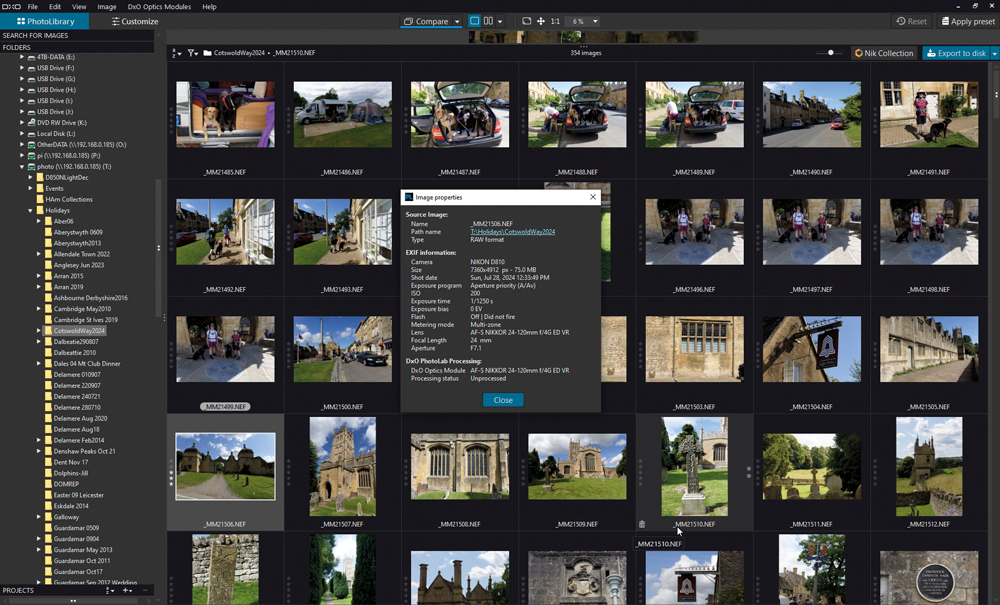
The PhotoLibrary module provides a way of browsing and managing photographs within the application. This is particularly interesting for photographers who want an integrated library alongside their editing software.
When a folder of photographs is opened for the first time, PhotoLab analyses the files, extracts their metadata and creates thumbnail previews.
In testing with 350 Nikon D810 RAW files, the initial processing took approximately five and a half minutes. Once the images had been indexed, however, browsing and opening individual files was much quicker.
Right-clicking an image thumbnail provides access to metadata and information about the optical module associated with the photograph.
For photographers who have moved away from software built around a subscription model, having an integrated photo library is another reason to consider PhotoLab.
RAW editing in DxO PhotoLab 8
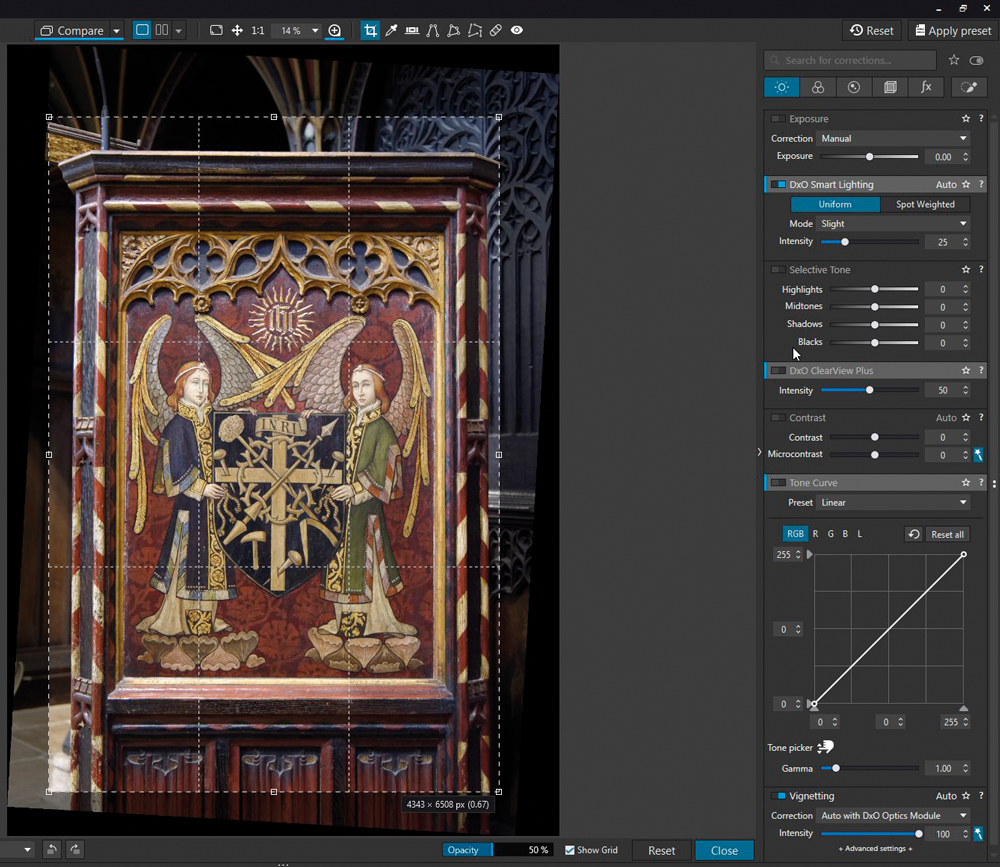
Opening an image takes you into the Customise workspace, where PhotoLab provides a comprehensive range of adjustment tools.
The main editing areas include:
- Light – exposure and tonal adjustments
- Colour – white balance and colour controls
- Detail – sharpening, noise reduction and related adjustments
- Geometry – perspective and geometric corrections
- Watermark & Effects – creative effects and watermarking
- Local Adjustments – selective editing using tools such as the adjustment brush
There are also numerous preset options covering different colour treatments, monochrome effects and creative looks.
This means PhotoLab can be used for anything from relatively straightforward RAW corrections through to much more involved image processing.
DxO’s optical corrections
Optical correction is one of the areas in which DxO PhotoLab has traditionally distinguished itself.
Rather than relying solely on generic lens profiles, DxO creates detailed modules based on measurements of specific camera and lens combinations.
Once the appropriate module is available, PhotoLab can use this information when processing the RAW file.
For photographers shooting with a range of lenses, this can provide a useful automated starting point and reduce the amount of manual correction required.
The software can address characteristics such as lens sharpness and optical imperfections, helping produce a cleaner starting point for further editing.
Noise reduction and image detail
Noise reduction is another major strength of DxO’s software.
Photographers working with high ISO images will often have to balance two competing requirements: removing unwanted noise while retaining fine detail.
DxO’s approach to noise reduction is particularly relevant to photographers who regularly shoot in difficult lighting conditions.
Combined with its sharpening and optical correction technologies, this forms a significant part of PhotoLab’s appeal.
Colour calibration with DxO PhotoLab
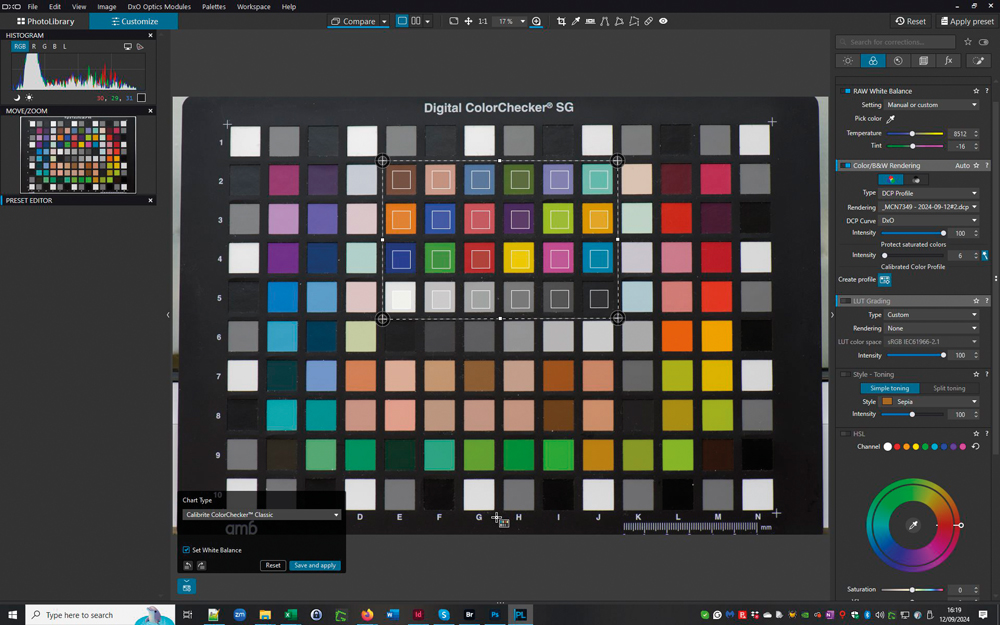
PhotoLab also provides support for DCP (Digital Camera Profile) calibration.
A DCP profile can be created using a suitable colour reference target and then applied when processing RAW photographs. This provides photographers with a method of refining the colour response of their camera and creating a more controlled workflow.
Testing carried out for Professional Imagemaker used a Macbeth ColorChecker target to investigate the accuracy achievable through PhotoLab’s calibration workflow.
An initial uncalibrated result produced an average colour error of approximately 5.10 ΔE00, with a maximum error of 9.4 ΔE00.
Creating a DCP profile using the ColorChecker reduced the average error to approximately 3.52 ΔE00. Applying a curves adjustment to align the black and white point luminance values reduced the average error further to 2.58 ΔE00.
A full ICC profile produced a further improvement to approximately 2.08 ΔE00, although this falls outside the calibration capabilities being assessed within PhotoLab itself.
For most photographers, these numbers are less important than the broader conclusion: PhotoLab provides a useful route towards more controlled and repeatable colour reproduction from RAW files.
Is DxO PhotoLab 8 worth considering?
DxO PhotoLab 8 brings together several powerful features in one package.
Its RAW processing tools are comprehensive, while its optical modules provide sophisticated camera and lens corrections without requiring every adjustment to be made manually.
The PhotoLibrary also makes PhotoLab more than simply a RAW converter, giving photographers a way to browse and organise their images alongside their editing workflow.
Its combination of RAW processing, noise reduction, sharpening, optical corrections, local adjustments and colour management makes it a capable solution for photographers who want extensive control over their images.
For photographers considering alternatives to subscription-based photo editing software, PhotoLab 8 is certainly worth investigating.
Key strengths of DxO PhotoLab 8
- Sophisticated RAW processing
- Advanced noise reduction
- Camera and lens-specific optical corrections
- Integrated PhotoLibrary
- Extensive colour and tonal controls
- Local adjustment tools
- DCP camera calibration
- Wide range of presets and creative effects
- Suitable for photographers who want a non-subscription editing workflow
A specialist alternative to mainstream photo editors
DxO PhotoLab 8 may not be the obvious choice for every photographer. Those who need a very extensive ecosystem of applications, cloud services or collaborative features may prefer other platforms.
However, for photographers whose priorities are high-quality RAW processing, optical correction, noise reduction and detailed control over their images, PhotoLab offers a compelling set of tools.
The software’s combination of measured camera and lens data with conventional editing controls is particularly attractive for photographers who want to get the best possible starting point from their RAW files.
This article is adapted and substantially rewritten from an article originally published in Professional Imagemaker. The software and features discussed relate specifically to DxO PhotoLab 8.