PortraitPro 24 Review: AI Portrait Retouching for Photographers
Portrait retouching has always been something of a balancing act.
A little careful editing can remove distractions and help a subject look their best. Push the controls too far, however, and you can quickly end up with a portrait that no longer looks like the person you photographed.
PortraitPro 24 takes an increasingly sophisticated approach to portrait editing, using artificial intelligence to identify facial features and provide dedicated controls for skin, hair, eyes, mouth, makeup, lighting and facial shape.
The software has been designed specifically for portrait photography, rather than being a general-purpose image editor with a handful of portrait tools added to it.
For professional photographers, that distinction can make a considerable difference to the speed of a workflow.
What is PortraitPro?
PortraitPro is specialist portrait retouching software from Anthropics Technology.
It uses image analysis to identify the subject’s face and facial features, allowing photographers to make targeted adjustments without having to manually construct every selection.
The software can be used as a standalone application, while the Studio editions provide additional workflow options including RAW support and integration with applications such as Photoshop and Lightroom.
There are three main editions: Standard, Studio and Studio Max.
Studio Max is aimed particularly at photographers who need to process larger numbers of portraits, adding fully automatic batch processing to the Studio feature set.
PortraitPro 24 and Generative AI
One of the major developments in PortraitPro 24 is the introduction of custom generative AI technology for specific portrait-editing tasks.
Rather than simply applying a generic filter to an entire photograph, these tools are designed to work on particular areas of a portrait.
New features include mouth and teeth enhancement, glasses-reflection reduction and face recovery.
That can be particularly useful when dealing with photographs that are otherwise good but contain one small problem.
And that brings us to one of the most interesting additions.
Glasses Repair
For photographers who regularly photograph people who wear glasses, reflections can be a frustrating problem.
The obvious solution is to control the lighting and camera position when taking the photograph. A professional portrait photographer should always try to solve the problem at source where possible.
But photography doesn’t always happen under perfectly controlled conditions.
Perhaps the subject has moved slightly. Perhaps a reflection appears unexpectedly. Maybe the photographer is working quickly at an event where there is little opportunity to reposition lights.
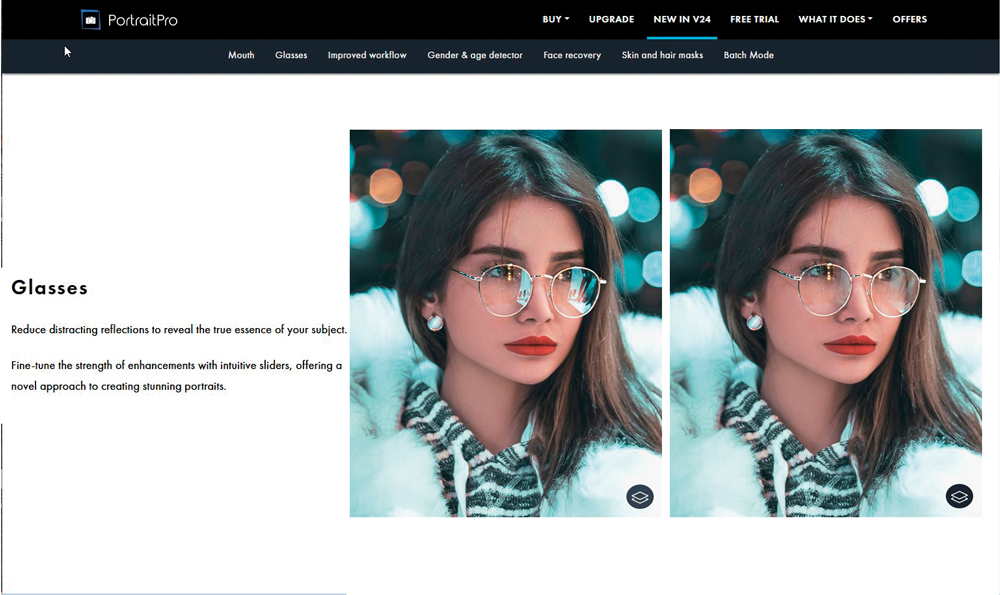
PortraitPro 24’s glasses tool is designed to reduce distracting reflections while retaining the appearance of the glasses.
This is a particularly useful distinction.
Simply removing the lenses or replacing the entire area with surrounding skin can produce an obviously artificial result. Someone looking at the finished portrait knows that a person wearing glasses should still have glasses.
The aim is therefore not to make the glasses disappear.
It is to make the reflection less distracting while retaining enough information to make the result believable.
For a photographer who has only a handful of otherwise excellent portraits spoiled by reflections, that could be one of the most useful time-saving features in the software.
Retouching skin without destroying it
Skin retouching is another area where restraint is important.
Modern portrait software can make skin remarkably smooth, but perfectly smooth skin often looks less realistic rather than more attractive.
Good portrait retouching should normally retain some of the natural texture and character of the subject.
PortraitPro provides dedicated skin-smoothing tools designed to reduce blemishes and unwanted variations while retaining skin texture. Anthropics’ current system includes its ClearSkin technology for this purpose.
The important thing is that the photographer remains in control.
A preset can provide a starting point, but the final strength should be appropriate to the subject, the intended use of the photograph and the photographer’s style.
A high-fashion image may deliberately use more extensive retouching than a family portrait.
A corporate headshot may need to look polished but still recognisably human.
There is no single correct amount of retouching.
How much should you change someone’s face?
PortraitPro can do much more than remove blemishes.
It provides tools for modifying facial features and proportions, which raises an important question for portrait photographers:
At what point does retouching stop being enhancement and start changing the person?
This isn’t simply a technical question.
People have different ideas about how they want to be photographed. Some clients will want every wrinkle removed. Others will specifically want their photographs to retain signs of age, character and personality.
The photographer therefore needs to understand the client’s expectations.
Before carrying out substantial retouching, consider what the photograph is for and what the subject actually wants.
A professional portrait should still look like the person who commissioned it.
The “warts and all” problem
The question of how much to alter a portrait is certainly not new.
The famous phrase “warts and all” is traditionally associated with Oliver Cromwell’s portrait, reflecting the idea that a sitter might prefer an honest representation rather than an idealised one.
Modern digital editing gives photographers vastly more control than a portrait painter had, but the underlying question remains surprisingly similar.
Do we want to record the person as they appeared, or create the most flattering version of them?
Neither approach is automatically right.
The important thing is that the photographer understands the purpose of the portrait and uses the available technology deliberately.
Mouth and teeth enhancement
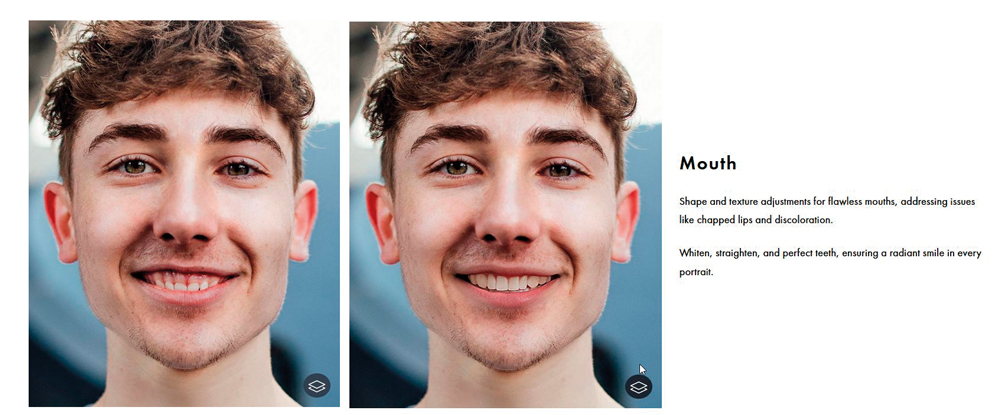
PortraitPro 24 also introduces AI-assisted tools for the mouth and teeth.
These can address issues such as chapped lips, discolouration and other distractions, while providing controls for improving the appearance of teeth.
Again, subtlety matters.
Teeth that are unnaturally white can become one of the first things a viewer notices in a portrait.
The goal should generally be to remove distractions rather than create an artificial smile.
The same principle applies to lips and other facial features.
Face Recovery
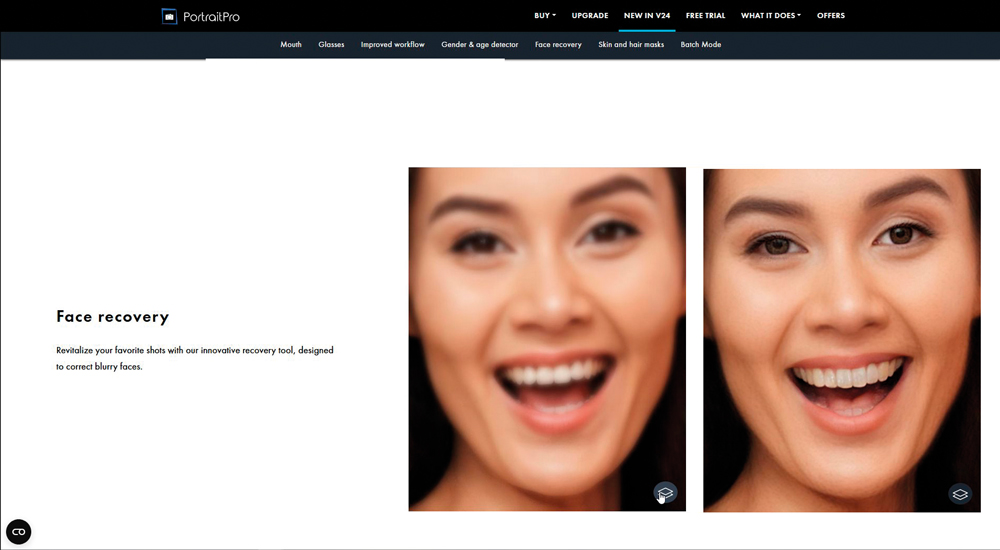
Another addition in PortraitPro 24 is Face Recovery, designed to help improve portraits where a face is blurry or lacks sufficient detail.
This is an interesting development because it moves beyond conventional retouching.
Traditional retouching works with the pixels that were captured.
AI-assisted recovery can attempt to reconstruct missing or unclear facial information.
That makes it potentially useful for photographs that would otherwise be difficult to rescue, but it also means photographers should be particularly careful about how the resulting image is used.
If the software has generated facial detail that wasn’t actually captured by the camera, it should not be confused with a genuine increase in photographic resolution.
For an artistic portrait, that may be perfectly acceptable.
For documentary or evidential photography, the implications are very different.
PortraitPro Studio Max and batch processing
For a portrait photographer processing a large shoot, the Studio Max edition is particularly interesting.
Its major workflow advantage is automatic batch processing.
Instead of opening and manually processing every portrait individually, a photographer can establish an editing approach and apply it across a large collection.
Anthropics describes Studio Max as its top edition, with full batch processing designed to speed up the editing of entire shoots.
This is where specialist software can have a direct commercial benefit.
Saving several minutes on one portrait may not seem significant.
Saving several minutes on several hundred portraits is a different matter entirely.
Presets and consistency
Presets can also be valuable for professional photographers.
If you have developed a particular style of portrait retouching, creating a preset allows you to reproduce that general treatment across a shoot.
This can help maintain consistency between images.
However, a preset should not be treated as a substitute for looking at every photograph.
Different lighting, expressions, skin tones, clothing and backgrounds will require different adjustments.
Use the preset as a starting point and then fine-tune individual portraits.
Working with Photoshop and Lightroom
PortraitPro doesn’t necessarily need to replace your existing editing software.
The Studio editions are designed to fit into established photographic workflows, including RAW processing and integration with Photoshop and Lightroom. PortraitPro can also operate as a Photoshop filter, allowing photographers to incorporate its tools into a broader editing process.
This makes sense for professional photographers.
Your main application might handle RAW development, compositing, colour management and final output, while PortraitPro is used for the specialist portrait work it does particularly well.
That way, you don’t have to change your entire workflow simply to take advantage of one specialist tool.
A useful tool for photographers — but not a substitute for good photography
PortraitPro is at its most useful when it solves problems that would otherwise consume significant amounts of time.
Glasses reflections are a good example.
If you can eliminate the reflection during the shoot, do that.
If you can’t, having a tool that can intelligently reduce it afterwards can potentially save a great deal of manual retouching.
The same applies to skin, teeth and other portrait adjustments.
Good photography should still come first.
Lighting, posing, expression, lens choice, background and communication with the subject all contribute far more to a successful portrait than the software used afterwards.
Don’t let the software become the style
Powerful portrait software creates a temptation to use every available control.
Eyes can be enlarged.
Faces can be reshaped.
Skin can be smoothed.
Teeth can be whitened.
Lighting can be changed.
Hair can be modified.
Almost every aspect of a face can potentially be altered.
That doesn’t mean it should be.
A photograph can become technically “better” according to the software while becoming less convincing to the viewer.
The best retouching is often the retouching that nobody notices.
Is PortraitPro 24 worth considering?
For portrait photographers, PortraitPro 24 is an interesting specialist addition to a professional editing workflow.
Its greatest strengths are speed and specialisation.
Instead of manually constructing every portrait retouch in Photoshop, photographers can use dedicated controls that understand the structure of a face and provide targeted adjustments.
The new glasses-reflection reduction is particularly practical, while the mouth, teeth and face-recovery tools extend the software beyond conventional skin retouching.
For photographers processing large numbers of portraits, Studio Max adds another significant advantage through automatic batch processing.
But perhaps the most important feature remains one that doesn’t appear in a specification sheet: control.
PortraitPro can make substantial changes to a person’s appearance. The photographer needs to decide how much is appropriate.
Used carefully, it can remove distractions, speed up repetitive work and help produce polished professional portraits.
Used without restraint, it can produce photographs that look less like people and more like computer-generated interpretations of them.
The software can do the retouching.
The photographer still needs to decide when enough is enough.