How to Create a Photography Website That Gets More Enquiries
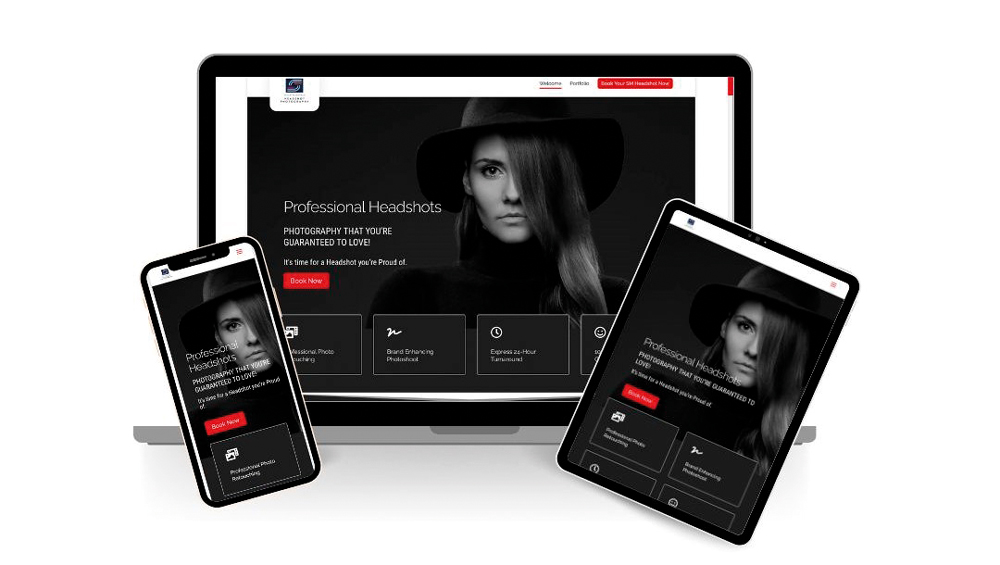
A photography website should do much more than display your best images.
It should help potential clients understand what you do, show them why you’re the right photographer for their needs, answer the questions they are likely to have and make it easy for them to take the next step.
That might be making an enquiry, booking a consultation, checking your availability or simply joining your mailing list so you can stay in touch.
Yet many photographers still have websites that function primarily as online galleries.
They can look fantastic, but if a potential client visits the site and has to work out what you offer, who you work with, where you’re based, what the experience is like or how to contact you, you may be losing enquiries without ever knowing it.
So, how do you create a photography website that actually helps you win clients?
Your photography website is part of your sales process
Think about the journey a potential client takes.
They might discover you through Google, Instagram, a recommendation or a link from another website. They then arrive on your website with a question:
“Could this photographer be right for me?”
Your website needs to help them answer that question.
A good photography website should:
- explain clearly what you offer
- show the type of photography you want to be booked for
- communicate who you work with
- demonstrate the quality and style of your work
- explain the benefits of working with you
- build trust through testimonials, reviews and experience
- answer common questions
- give visitors an indication of what happens next
- make it easy to enquire or book
This doesn’t mean turning your website into one long sales pitch.
It means giving people the information they need to make a confident decision.
Google’s current guidance also emphasises creating helpful, reliable, people-first content rather than producing pages primarily for search engines.
A beautiful portfolio isn’t enough
Photographers naturally want their websites to look great.
That’s completely understandable.
Your photography is the product you’re selling, so your images need to be prominent and presented properly.
But there’s a difference between showing photographs and selling photography.
Imagine visiting a hotel website that contained nothing but photographs of bedrooms.
The images might be beautiful, but you’d still want to know where the hotel is, how much it costs, what’s included, whether there’s parking, what the rooms are like and what previous guests thought.
Photography clients are no different.
They want to see your work, but they also want to understand the experience of working with you.
Your images create the initial attraction. Your words, information and proof help turn that interest into an enquiry.
What should a potential client understand immediately?
When somebody lands on your homepage, they shouldn’t have to investigate your website to discover what you actually do.
Within a few moments, they should be able to understand:
What do you photograph?
Wedding photography? Family portraits? Commercial work? Headshots? Newborns? Property? Products?
Who do you photograph?
Couples, families, business owners, companies, agencies, schools or perhaps a very specific type of client?
Where do you work?
If your business is geographically focused, make the area clear.
For example:
Wedding Photographer in Manchester
is considerably more useful to a potential client than:
Capturing Your Story
The second may sound nice, but it doesn’t immediately tell the visitor whether they’ve found the right photographer.
What makes your service different?
Perhaps you’re known for relaxed family portraits, unobtrusive wedding photography, fast commercial headshots or a particular style of fine-art portraiture.
Tell people.
Start with your homepage
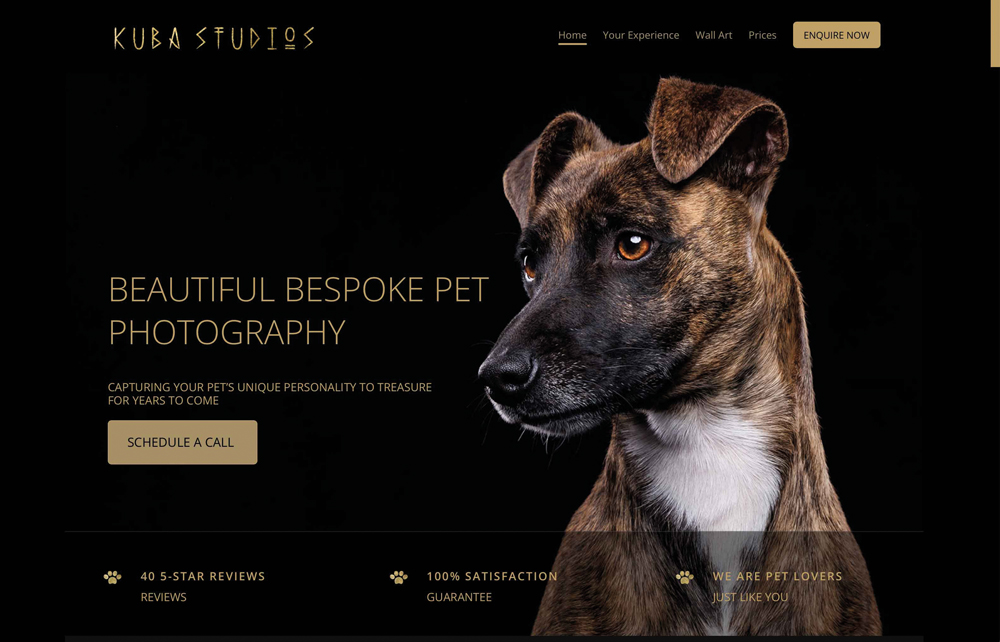
Your homepage is often the first major interaction somebody has with your business, so it needs to work hard.
The opening section of your website — often called the hero section — should give visitors a reason to continue.
You don’t need to cram every piece of information into it.
In fact, trying to say everything at once usually makes the design harder to understand.
Instead, aim for clarity.
A strong opening section might contain:
- a relevant, high-quality photograph
- a clear description of the service you offer
- the location or market you serve
- a short statement about the benefit or experience you provide
- an obvious next step
For example:
Relaxed Family Photography in Cheshire
Natural family portraits created in a relaxed studio environment.
View Family Sessions
That’s much more useful than simply placing your name and a beautiful photograph on the screen.
Give visitors a clear next step
One of the easiest mistakes to make is assuming people will know what to do next.
Don’t make them guess.
If you want enquiries, give them an obvious way to enquire.
Depending on your business, your main call to action could be:
- Check Availability
- Book a Consultation
- Enquire Now
- View Packages
- Book Your Session
- Contact Me
- Arrange a Call
You don’t necessarily need the same button everywhere, but your website should make the next step obvious.
Someone who is ready to book shouldn’t have to search through your navigation to find your contact details.
Don’t forget visitors who aren’t ready to buy
Not everybody who visits your website will be ready to book immediately.
Someone planning a wedding might be researching photographers months before their date.
A family might be considering a portrait session but still deciding what they want.
A business owner might be comparing several photographers before making contact.
That doesn’t mean the visitor is worthless.
Give them another way to stay connected.
An email newsletter, useful guide, downloadable resource or occasional photography advice can give you permission to remain in contact with people who aren’t ready to book today.
Just make sure you offer something genuinely useful rather than simply asking people to “sign up for our newsletter”.
Tell visitors what they get
Photographers sometimes spend too much time talking about themselves and not enough time explaining the client’s experience.
Your website visitor is rarely interested in what camera you use.
They want to know what it’s like to work with you and what they will get at the end of the process.
Think about the questions your clients ask you before booking.
For example:
- How long does the session take?
- Where does the photography take place?
- What should we wear?
- How many images will we receive?
- How quickly will we receive them?
- Do you provide albums or prints?
- Can we purchase additional images?
- What happens if the weather is bad?
- How far do you travel?
- How does the booking process work?
Answer those questions on your website.
The more uncertainty you remove, the easier it becomes for somebody to take the next step.
Explain the benefits, not just the features
This is an important distinction.
A feature tells somebody what you provide.
A benefit tells them why it matters to them.
For example:
Feature:
24-hour headshot delivery.
Benefit:
Need your new headshot for an important presentation? Your finished images can be ready the following day.
Or:
Feature:
Professional hair and make-up available.
Benefit:
You don’t need to organise a separate appointment — everything can be arranged as part of your photography experience.
Look through your website and ask yourself:
“So what does this mean for my client?”
If you can answer that question, your website copy will become much more useful.
Show proof that you can deliver
Anyone can say they’re experienced, professional or passionate.
Potential clients want evidence.
This is where testimonials, reviews, awards, publications, professional qualifications and relevant experience can help.
Don’t hide all of this on a page nobody visits.
Use it where it makes sense throughout your website.
For example, a testimonial from a wedding client can sit alongside information about your wedding photography.
A commercial client logo can appear on your commercial photography page.
A review about your relaxed approach to family photography can reinforce the message on your portrait page.
The important thing is that the proof supports the claim you’re making.
Make your portfolio work harder
Your portfolio remains one of the most important parts of a photography website.
But don’t simply upload everything you’ve ever photographed.
Curate it.
If you want more wedding clients, your wedding portfolio should demonstrate the kind of weddings you want to photograph.
If you want commercial clients, show commercial work.
If you specialise in corporate headshots, make those images easy to find.
A potential client shouldn’t have to scroll through hundreds of unrelated photographs to find evidence that you can provide the service they need.
Your portfolio should make the decision easier.
Give your images context
A photograph can be powerful, but a little context can make it even more useful.
Instead of simply displaying an image, consider explaining what it represents.
For example:
Corporate Headshots – Manchester
A relaxed headshot session for a technology company, creating consistent portraits for the company’s website and LinkedIn profiles.
Now the potential client can imagine themselves having the same experience.
This also gives search engines useful information about what the page is actually about.
Google’s Search Essentials guidance recommends using words people would use to search for your content in prominent and descriptive parts of a page, while still creating helpful content for people first.
Should you display your prices?
There isn’t one answer that works for every photographer.
Some photographers publish complete pricing and packages.
Others prefer to give starting prices or explain that every commission is bespoke.
What matters is avoiding unnecessary mystery.
If price is one of the first questions your clients ask, consider answering it somewhere on your website.
Even something as simple as:
Portrait sessions from £250
can help a visitor understand whether your service is likely to fit their budget.
You can then provide more detailed information on your pricing or investment page.
Make your website easy to use on a phone
Your website might look fantastic on a large desktop monitor, but many potential clients will first encounter it on a phone.
Check your website yourself on a mobile device.
Don’t just look at the homepage.
Try actually behaving like a potential customer.
Can you:
- read the text easily?
- navigate the menu?
- view your photographs properly?
- find your location?
- find your pricing?
- contact you?
- complete your enquiry form?
- tap your phone number?
- book a consultation?
If something is awkward, fix it.
Google’s current page-experience guidance specifically recommends checking that pages work well on mobile, are secure and provide a good overall experience. Core Web Vitals are also part of Google’s ranking systems, although Google makes clear that good scores alone do not guarantee higher rankings.
Don’t make your website unnecessarily slow
Photography websites have a particular problem.
We love large, beautiful images — and browsers love making us wait for them.
Your photographs need to look good, but they don’t need to be enormous files.
Optimise your images for the web and pay particular attention to the images that load immediately when somebody visits your homepage.
A slow website isn’t just frustrating. It can prevent a potential client from ever seeing your work.
Use tools such as Google Search Console and PageSpeed Insights to identify technical problems and performance issues rather than relying on guesswork.
Your About page still matters
There is a temptation to think that potential clients don’t care about the photographer.
They do.
But your About page needs to be about more than your journey from picking up your first camera to becoming a professional photographer.
The question your visitor is really asking is:
“Can I trust this person to photograph me, my family, my wedding or my business?”
Tell them what is relevant to that decision.
Your experience, approach, personality, qualifications, awards, publications and the way you work can all help build that confidence.
And don’t be afraid to let people see the person behind the business.
People buy from people.
Every important page should have a purpose
Don’t think of your website as one giant portfolio.
Think about each page as having a job.
Your wedding photography page should help someone interested in wedding photography.
Your commercial page should speak to commercial clients.
Your headshot page should explain your headshot service.
Your blog should answer questions and attract people who are researching photography.
Your contact page should make it easy to get in touch.
When every page has a clear purpose, the website becomes much easier for visitors to navigate.
Look at your website through your client’s eyes
Here’s a simple exercise.
Open your website and imagine that you’ve never seen it before.
Then ask yourself:
What do I do?
Who is this photographer for?
Where are they based?
What do they offer?
Why should I choose them?
What will it be like to work with them?
How much is it likely to cost?
What do previous clients say?
What should I do next?
If you can’t find the answers quickly, your website probably needs some work.
You can also ask somebody who doesn’t know your business particularly well to look at your homepage for 10 seconds.
Don’t explain anything to them.
Ask them what they think you do, who you photograph and what they think they should do next.
Their answer could be very revealing.
Your website should sell without feeling like a sales pitch
The best photography websites don’t need to shout at visitors.
They simply give them the information, reassurance and inspiration they need.
Your photographs create the emotional connection.
Your words explain the service.
Your testimonials provide proof.
Your experience builds trust.
Your calls to action make the next step easy.
Put all of those elements together and your website becomes much more than an online gallery.
It becomes part of your sales process.
And that’s the real goal.
Don’t just build a photography website that looks good. Build one that helps the right clients understand what you do, trust you and take the next step.